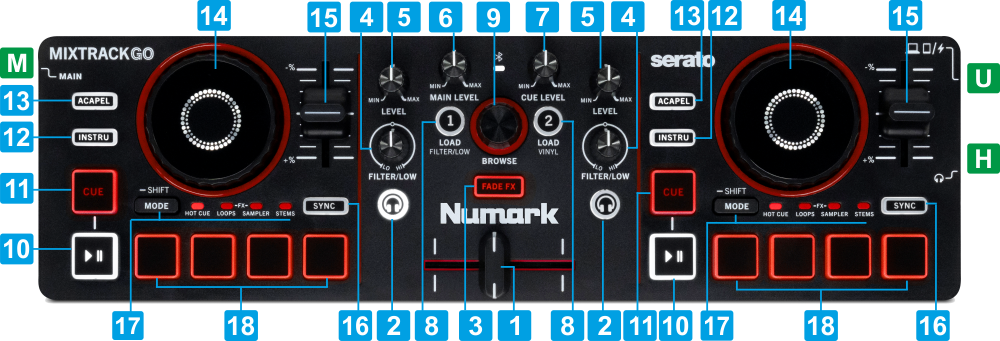
U USBUSB port to connect to a computerM MASTER OUTPUTConnect a pair of amplified speakers using a 1/8 " cable or adapterH HEADPHONES SOCKETConnect your Headphones using a 1/8 " cable or adapter
KEY
ACTION
SHIFT ACTION
1 CROSSFADERBlends audio signals from left and right decks2 PFLSends pre-fader audio signal to the Headphones channel (for pre-listening) 3 FADE FXEnable/disable the selected Mixer FX. When enabled, an FX will be applied as the crossfader is moved from one side to the other. See MIX FX (Nr.7) in ManualSelect a Mixer FX from the popup list4 FILTER/EQ-LOWIn Filter mode : adjust the selected Color FX (Filter by default) In EQ Low mode : adjust the Low EQ frequencies or the selected Stem channel dpeending on the EQ mode See EQ Modes in Manual5 LEVELAdjust the Volume level of Left/Right Deck 6 MAIN LEVELAdjust the Volume level of the Master Output7 CUE LEVELAdjust the Volume level of the Headphones Output8 LOADLoad the selected track to Left/Right deck. Double-press fast to clone the Track from the calling Deck to the opposite deckLeft button : Set the Filter/Low knobs to Filter or EQ Low mode on both decks. Right button : Toggle Vinyl/Scratch mode on both decks9 BROWSEScroll through Folders or Tracks Push to toggle focus between Folders and Songs List. When in Folders list, push for more than 1 second to expand/collapse sub-foldersScroll fast (10 Tracks/Folders on each step) through Folders or Tracks Push to set focus to Browser's Sideview. When in Sideview, push to cycle through the available lists (Sidelist, Automix, Karaoke etc)10 PLAYPlay/Pause DeckPlay-Stutter Deck11 CUESets current position as Temporary Cue point. Preview track when paused while button is pressed.Jumps and stops to the Cue point when playingJumps to the begiining of the loaded Track12 INSTRUMENTALOutputs only the Instrumental Stems (mute Vocals)Outputs only the Instrumental Stems by Echoing Out (and mute) the Vocals Stem13 ACAPELLAOutputs only the Vocals Stem (mute Instrumental) Outputs only the Vocals Stem by Echoing Out (and mute) the Instrumental Stem14 JOGTouch sensitive jogwheel for Scratch (when Vinyl mode is enabled) or Bend (when Vinyl mode is disabled)IFast seek Ihrough the loaded Track15 PITCHAdjust track's tempo (BPM)16 SYNCMatch BPM and Beat Phase with the opposite deckSmoothly reset Deck's Tempo to its original value17 SHIFT/MODESPress to cycle through the Pad modes (Hotcues, Loops, FX, Sampler and Stems). See Pads Hold down for more than 1 second to access the SHIFT/secondary actions as describe above18 PADS 1-4The 4 numbered Pads offer different functionality depending on the selected Pad mode. See Pads The 4 numbered Pads offer different functionality depending on the selected Pad mode. See Pads