


Mixtrack GO
PADS
The 4 numbered Pads of the Numark Mixtrack GO offer different functionality, depending on the selected Mode. Use the PAD MODE button (Nr. 17) to cycle through the 5 available modes (Hotcues, Loops GO, PadFX GO , Sampler and Stems+FX).
The Hotcues, Sampler and Stems FX are by default available in VirtualDJ as per the links above. The Loops GO and PadFX GO are special Pad pages which are available only if the Mixtrack GO is connected and the functionality of the Pads is described below.
LOOPS GO
Use the PAD MODE button until the second Led (LOOP) is lit to set the Pads to Loop mode. The special Loops GO page will be then selected and displayed in the VirtualDJ GUI
Note : The special Loops GO page is only available when the Mixtrack GO is connected
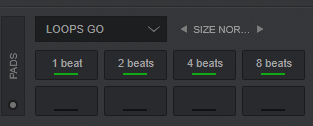
In this mode, the 4 numbered Pads trigger an auto-Loop of a different size in beats, depending on the selected Loop Size Bank.
3 different Banks are available (Small, Normal and Large) offering loop sizes from 1/8 to 64 beats. Use the arrow buttons on the Skin to select the next/previous Loop bank
PADFX GO
Use the PAD MODE button (Nr.17) until both the second Led (LOOP) and the 3rd led (SAMPLER) is lit to set the Pads to PadFX GO mode. The special PadFX GO page will be then selected and displayed in the VirtualDJ GUI
Note : The special PadFX GO page is only available when the Mixtrack GO is connected
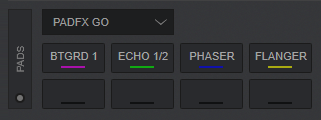
In this mode, the 4 numbered Pads trigger an Effect as described below. The pads will toggle (enable/disable) the pre-defined FX, but if held for more than 1 second, the FX will be triggered only while the Pad is pressed
- Pad 1 : BeatGrid FX (pattern 1)
- Pad 2 : Echo FX 1/2 beat
- Pad 3 : Phaser FX 16 beats
- Pad 4 : Flanger FX 8 beats
- SHIFT+Pad 1 : Loop Roll FX 1/2 beat
- SHIFT+Pad 2 : Echo Out FX 1 beat
- SHIFT+Pad 3 : BrakeStartFX
- SHIFT+Pad 4 : ScaleDownFX
