


 DJJamieFox
I'm posting this more as a topic to advise people of this even though parts of this have been covered in other posts. We've seen the sticky on KB5074105, KB5077181 & KB5077241 about the uninstallation of these to restore connectivity to Rane and other controllers...
Here's what I have discovered so far:
1. If you caught the problem EARLY enough after the updates came out and were installed, you most likely would be able to uninstall them, pause updates, and be ok.
2. If you did not catch them early enough and more updates were installed (cumulative) then the only course of action is to reformat and reinstall Windows 11 with a slightly earlier version, do not let it update during the install, pause updates after install.
3. InMusic (Rane, M-Audio, etc..) drivers are conflicting with MIDI 2.0 and most likely will not be fixed by a future version of MIDI 2.0. Pete at Microsoft said there are problems with those drivers and have to be fixed by InMusic to be compatible. Pete has reached out to InMusic concerning this.
It look like Rane users (and others) will be stuck at paused updates for a bit until this is all sorted out.
Lastly, This is NOT a Virtual DJ or Serato problem but rather a perfect storm of MIDI 2.0 being a mandatory update and incompatible InMusic Drivers to the new MIDI service.
I just wish there was a way to restore the previous MIDI with out having to pause updates. I feel like we're caught in the middle.
Here's what I have discovered so far:
1. If you caught the problem EARLY enough after the updates came out and were installed, you most likely would be able to uninstall them, pause updates, and be ok.
2. If you did not catch them early enough and more updates were installed (cumulative) then the only course of action is to reformat and reinstall Windows 11 with a slightly earlier version, do not let it update during the install, pause updates after install.
3. InMusic (Rane, M-Audio, etc..) drivers are conflicting with MIDI 2.0 and most likely will not be fixed by a future version of MIDI 2.0. Pete at Microsoft said there are problems with those drivers and have to be fixed by InMusic to be compatible. Pete has reached out to InMusic concerning this.
It look like Rane users (and others) will be stuck at paused updates for a bit until this is all sorted out.
Lastly, This is NOT a Virtual DJ or Serato problem but rather a perfect storm of MIDI 2.0 being a mandatory update and incompatible InMusic Drivers to the new MIDI service.
I just wish there was a way to restore the previous MIDI with out having to pause updates. I feel like we're caught in the middle.
Posted Thu 12 Mar 26 @ 5:17 pm
 rico94
Bloquer ces mises à jour est pour le moment la seule solution qui fonctionne, car j'ai rencontré exactement les mêmes problèmes avec un Denon Live 2, plus rien ne fonctionnait que ce soit avec Virtual ou Serato, un sacré casse tête qui m'a rendu dingue pendant 4 jours et ce sur mes 2 portables. Après plusieurs réinstallations du soft et même de windows je me suis rendu à l'évidence d'un problème de communication midi une fois le blocage des updates terminé le problème !!!!
Windows crée pour chaque nouvelle mise à jour de nouveaux problèmes, cela est devenu tellement récurrent que maintenant je les bloque par mesure de prévention.
Windows crée pour chaque nouvelle mise à jour de nouveaux problèmes, cela est devenu tellement récurrent que maintenant je les bloque par mesure de prévention.
Posted Thu 12 Mar 26 @ 6:17 pm
DJJamieFox
rico94 wrote :
Bloquer ces mises à jour est pour le moment la seule solution qui fonctionne, car j'ai rencontré exactement les mêmes problèmes avec un Denon Live 2, plus rien ne fonctionnait que ce soit avec Virtual ou Serato, un sacré casse tête qui m'a rendu dingue pendant 4 jours et ce sur mes 2 portables. Après plusieurs réinstallations du soft et même de windows je me suis rendu à l'évidence d'un problème de communication midi une fois le blocage des updates terminé le problème !!!!
Windows crée pour chaque nouvelle mise à jour de nouveaux problèmes, cela est devenu tellement récurrent que maintenant je les bloque par mesure de prévention.
Windows crée pour chaque nouvelle mise à jour de nouveaux problèmes, cela est devenu tellement récurrent que maintenant je les bloque par mesure de prévention.
Translated to English (for me),,
"Blocking these updates is currently the only solution that works, because I encountered the exact same problems with a Denon Live 2. Nothing worked, whether with Virtual or Serato—a real headache that drove me crazy for four days on both of my laptops. After several software and even Windows reinstalls, I realized it was a MIDI communication problem. Once the update blocking was complete, the problem disappeared! Windows creates new problems with every new update; it's become so frequent that I now block them as a preventative measure."
Understood... My second backup laptop it was too late for. That forced me to reinstall windows rather than simply uninstalling the updates. I hardly ever use the second one. I was going crazy trying to find a solution to this.
This affects Denon too? I guess it would since it is also an InMusic product. I did post on the Rane Four forums as well and no response from them.
Posted Thu 12 Mar 26 @ 6:55 pm
 DJROYAL-T BELGIUM
Hi, thx for the headsup, so just to be sure, the controller being glitchy or non responsive is a windows issue from the last update? I spent about an hour yesterday trying to figure out what was going on , but ended up replacing the rane with my old nxs2 setup.
Posted Sun 15 Mar 26 @ 10:37 am
DJJamieFox
DJROYAL-T BELGIUM wrote :
Hi, thx for the headsup, so just to be sure, the controller being glitchy or non responsive is a windows issue from the last update? I spent about an hour yesterday trying to figure out what was going on , but ended up replacing the rane with my old nxs2 setup.
It is the issue if you have Rane, Denon, Hercules or a few others AND and an updated windows machine.
This is VDJ sticky on the issue: https://virtualdj.com/wiki/win11kb5074105.html
One symptom is VDJ will hang when you try to close it. The driver won't close.
Posted Sun 15 Mar 26 @ 11:29 am
DJJamieFox
So after some more research I have received an 'Unofficial' workaround for this issue that won't involve uninstalling updates nor pausing updates. I am currently resuming windows updates and testing this tool and procedure. I will detail it here when I see that it works. I do understand that this may not work well into the future but may give InMusic enough time to update their side of the equation.
Posted Tue 17 Mar 26 @ 4:24 am
 kradcliffe
This is a text book example of why I use a 3rd party tool to block windows updates on my gig machine. It's a 2019 Lenovo C940 running Windows 11 and I only update Windows maybe every 18 months after having taken a system image first.
Although the best "advice" is to always install the latest windows updates, as a laptop DJ I've been bitten several times since 1999 so doing this has ensured my MCX8000 works at every gig with no issues whatsoever.
Although the best "advice" is to always install the latest windows updates, as a laptop DJ I've been bitten several times since 1999 so doing this has ensured my MCX8000 works at every gig with no issues whatsoever.
Posted Tue 17 Mar 26 @ 4:46 am
DJJamieFox
Ok, so here's a fix I was posting about... Before I post this, I will say MS does not support this officially nor is it a guarantee that it will continue to work after updates over time, so use at your own risk.
1. you will need ViVeTool to do this and disable the MIDI 2.0 feature by itself. Found here: https://github.com/thebookisclosed/ViVe/releases/download/v0.3.3/ViVeTool-v0.3.3.zip
2. I extracted this to c:\vive, but you can extract it to wherever you like.
3. After you extract ViVeTool, navigate to its directory and open a Power Shell terminal in it.
4. The command is:
5. Restart your machine.
This worked as expected on my machine. Not the exact fix I wanted but at least I won't have to pause updates until InMusic addresses the problem on their end. This will disable the MIDI 2.0 feature alone. Hope it helps.
The video describing this can be found here: https://www.youtube.com/watch?v=iuu5eXQIoOg&t=148s
Look at time index 2:30.
TY Pete for the heads up!
1. you will need ViVeTool to do this and disable the MIDI 2.0 feature by itself. Found here: https://github.com/thebookisclosed/ViVe/releases/download/v0.3.3/ViVeTool-v0.3.3.zip
2. I extracted this to c:\vive, but you can extract it to wherever you like.
3. After you extract ViVeTool, navigate to its directory and open a Power Shell terminal in it.
4. The command is:
.\ViVeTool.exe /disable /id:58988972
5. Restart your machine.
This worked as expected on my machine. Not the exact fix I wanted but at least I won't have to pause updates until InMusic addresses the problem on their end. This will disable the MIDI 2.0 feature alone. Hope it helps.
The video describing this can be found here: https://www.youtube.com/watch?v=iuu5eXQIoOg&t=148s
Look at time index 2:30.
TY Pete for the heads up!
Posted Tue 17 Mar 26 @ 5:06 am
DJJamieFox
kradcliffe wrote :
This is a text book example of why I use a 3rd party tool to block windows updates on my gig machine. It's a 2019 Lenovo C940 running Windows 11 and I only update Windows maybe every 18 months after having taken a system image first.
Although the best "advice" is to always install the latest windows updates, as a laptop DJ I've been bitten several times since 1999 so doing this has ensured my MCX8000 works at every gig with no issues whatsoever.
Although the best "advice" is to always install the latest windows updates, as a laptop DJ I've been bitten several times since 1999 so doing this has ensured my MCX8000 works at every gig with no issues whatsoever.
That is excellent advice as long as a person uses their laptop for DJ use only. I personally do that and left updates on automatic. So, yea, it bit me in the butt this time. I've 'fixed' 14 of these machines for DJ friends of mine and roughly half use their laptops for other things besides DJing despite my advice to dedicate it to DJing.
Posted Tue 17 Mar 26 @ 2:08 pm
DJJamieFox
DJJamieFox wrote :
Ok, so here's a fix I was posting about... Before I post this, I will say MS does not support this officially nor is it a guarantee that it will continue to work after updates over time, so use at your own risk.
1. you will need ViVeTool to do this and disable the MIDI 2.0 feature by itself. Found here: https://github.com/thebookisclosed/ViVe/releases/download/v0.3.3/ViVeTool-v0.3.3.zip
2. I extracted this to c:\vive, but you can extract it to wherever you like.
3. After you extract ViVeTool, navigate to its directory and open a Power Shell terminal in it.
4. The command is:
5. Restart your machine.
This worked as expected on my machine. Not the exact fix I wanted but at least I won't have to pause updates until InMusic addresses the problem on their end. This will disable the MIDI 2.0 feature alone. Hope it helps.
The video describing this can be found here: https://www.youtube.com/watch?v=iuu5eXQIoOg&t=148s
Look at time index 2:30.
TY Pete for the heads up!
1. you will need ViVeTool to do this and disable the MIDI 2.0 feature by itself. Found here: https://github.com/thebookisclosed/ViVe/releases/download/v0.3.3/ViVeTool-v0.3.3.zip
2. I extracted this to c:\vive, but you can extract it to wherever you like.
3. After you extract ViVeTool, navigate to its directory and open a Power Shell terminal in it.
4. The command is:
.\ViVeTool.exe /disable /id:58988972
5. Restart your machine.
This worked as expected on my machine. Not the exact fix I wanted but at least I won't have to pause updates until InMusic addresses the problem on their end. This will disable the MIDI 2.0 feature alone. Hope it helps.
The video describing this can be found here: https://www.youtube.com/watch?v=iuu5eXQIoOg&t=148s
Look at time index 2:30.
TY Pete for the heads up!
Two things I omitted here... Open Power Shell as an admin. Also, the ViVeTool will disable KB5077181 rather than uninstall it. If or when MS and InMusic get this issue resolved, you can simply enable the update again using the command:
.\ViViTool.exe /enable /id:58988972
Here is a list of what else KB5077181 contains: https://pureinfotech.com/kb5077181-windows-11-february-2026-update/
Hope this helps! Cheers!
Posted Tue 17 Mar 26 @ 2:16 pm
DJJamieFox
Just FYI...
I got a lot of the info from Pete Brown's MIDI 2.0 Discord group. I just put into a procedure that could be understood more clearly. The issue for the Rane Four is that its drivers are audio+MIDI. After testing against my Rane Four, the second method in the #start-here part of Pete's Discord group does not work. That method involves uninstalling the Rane Four drivers and using the in-box windows MIDI drivers with KB5077181 re-enabled. Without the Rane drivers, the Rane audio devices do not show at all. I can also confirm that the only KB that had the MIDI 2.0 is KB5077181.
So, where does that leave us? I can confirm that the ViVeTool method works well but for how long it will is the mystery. Let's hope Rane (InMusic) quickly comes up with a firmware or drivers that fixes this. I know Pete is in touch with InMusic about this very issue. I would imagine the new firmware and/or driver they make will be class-compliant with windows new MIDI. I have read that MS may blacklist the InMusic drivers if they don't fix them. So, yea, they'll fix them soon.
Lastly, Pete Brown nor Microsoft cannot and will not officially support this method (ViVeTool). As such, he will not answer questions concerning this. I am thankful he did publish the info he did anyway. He realized there was a problem and helped us. I, however, will answer what I can about this and my research.
Cheers!
I got a lot of the info from Pete Brown's MIDI 2.0 Discord group. I just put into a procedure that could be understood more clearly. The issue for the Rane Four is that its drivers are audio+MIDI. After testing against my Rane Four, the second method in the #start-here part of Pete's Discord group does not work. That method involves uninstalling the Rane Four drivers and using the in-box windows MIDI drivers with KB5077181 re-enabled. Without the Rane drivers, the Rane audio devices do not show at all. I can also confirm that the only KB that had the MIDI 2.0 is KB5077181.
So, where does that leave us? I can confirm that the ViVeTool method works well but for how long it will is the mystery. Let's hope Rane (InMusic) quickly comes up with a firmware or drivers that fixes this. I know Pete is in touch with InMusic about this very issue. I would imagine the new firmware and/or driver they make will be class-compliant with windows new MIDI. I have read that MS may blacklist the InMusic drivers if they don't fix them. So, yea, they'll fix them soon.
Lastly, Pete Brown nor Microsoft cannot and will not officially support this method (ViVeTool). As such, he will not answer questions concerning this. I am thankful he did publish the info he did anyway. He realized there was a problem and helped us. I, however, will answer what I can about this and my research.
Cheers!
Posted Wed 18 Mar 26 @ 12:22 pm
HardyHardwich82
Adreas Ruhmer from Germany wrot a small tool:
https://cloud.ruhmer.net/index.php/s/FAnXZbbe4TfFo9X?opendetails=
Posted Thu 19 Mar 26 @ 7:15 am
DJJamieFox
HardyHardwich82 wrote :
Adreas Ruhmer from Germany wrot a small tool:
https://cloud.ruhmer.net/index.php/s/FAnXZbbe4TfFo9X?opendetails=
Not to sound rude. No way I'd introduce and unknown file to my machine especially getting a virus warning when you execute the file. That's why Pete Brown from Microsoft alluded to the procedure I posted using ViVeTool (a LONG known tool). Plus, the update will stay disabled until you re-enable it. Either way, use this at your own risk.
In other words, the best overall solution to this problem is the procedure I already posted. Until InMusic gets a solution out to us.
Posted Thu 19 Mar 26 @ 12:25 pm
DJJamieFox
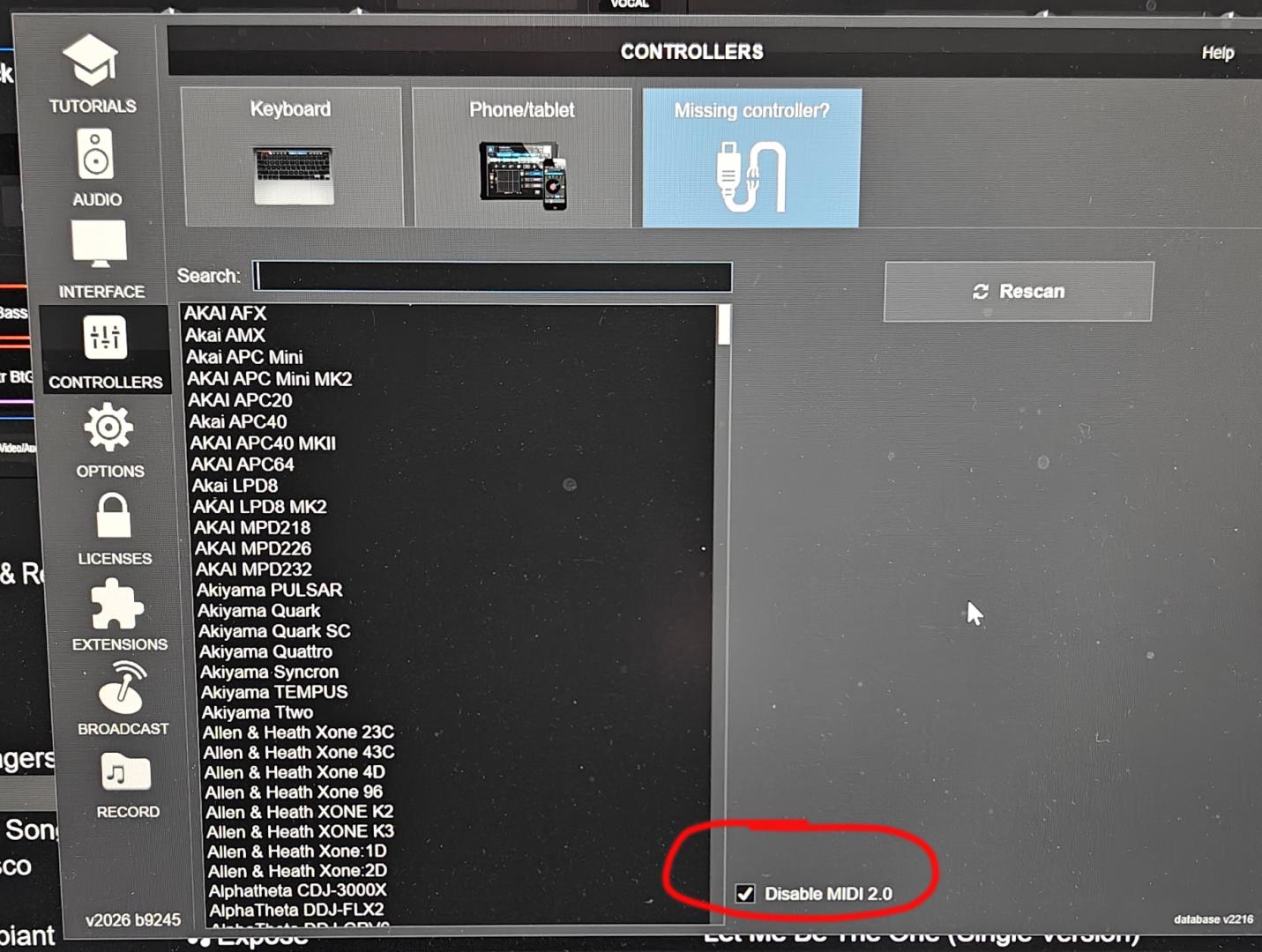
FYI: As of this morning Virtual DJ released early access (b9245) that has a check box to disable/enable MIDI 2.0! You'll find this in Controllers -> Missing Controller?, Look for the MIDI 2.0 check box on the lower right. Way to go Virtual DJ!
Posted Wed 25 Mar 26 @ 3:45 pm
 DJ Faber Zee
Do we have a list of affected controllers? I’ve used both the DDJ-1000 and the XDJ-RX2 without any issues so far. However, I might play at a venue with different equipment, so it would be helpful to know in advance whether a specific controller is impacted or not.
Posted Thu 26 Mar 26 @ 7:08 am
 groovindj
Does it really matter now? Just use the latest EA build to turn off MIDI 2.0 and your troubles are over.
If using EA builds at gigs concerns you (it shouldn't) install b9245, turn off MIDI 2.0 then install the standard version.
I would add that with the sheer amount of natively supported controllers in VDJ and all the mappings of others, it would be an impossible task to make a list.
If using EA builds at gigs concerns you (it shouldn't) install b9245, turn off MIDI 2.0 then install the standard version.
I would add that with the sheer amount of natively supported controllers in VDJ and all the mappings of others, it would be an impossible task to make a list.
Posted Thu 26 Mar 26 @ 9:54 am
DJ Faber Zee
Actually, having a list of affected controllers would be helpful. This was just a question, since the issue isn’t very clear. Saying that “some controllers might be affected” is a bit vague. If such a list isn’t available, I’ll just wait for the official build to be released.
Posted Thu 26 Mar 26 @ 9:58 am
Adion
So far it appears most Pioneer/AlphaTheta controllers are not affected and work fine with Midi 2.0
Most InMusic controllers (Denon/Rane/Numark) that require drivers appear to be affected.
There's also been reportrs of at least some Hercules controllers being affected.
Most InMusic controllers (Denon/Rane/Numark) that require drivers appear to be affected.
There's also been reportrs of at least some Hercules controllers being affected.
Posted Thu 26 Mar 26 @ 10:00 am
DJ Faber Zee
Adion wrote :
So far it appears most Pioneer/AlphaTheta controllers are not affected and work fine with Midi 2.0
Most InMusic controllers (Denon/Rane/Numark) that require drivers appear to be affected.
There's also been reportrs of at least some Hercules controllers being affected.
Most InMusic controllers (Denon/Rane/Numark) that require drivers appear to be affected.
There's also been reportrs of at least some Hercules controllers being affected.
Thanks...very helpful insights...as specified, with two Pioneer controllers I had no issues at the time...
Posted Thu 26 Mar 26 @ 10:03 am
 PhantomDeejay
DJ Faber Zee wrote :
Actually, having a list of affected controllers would be helpful. This was just a question, since the issue isn’t very clear. Saying that “some controllers might be affected” is a bit vague. If such a list isn’t available, I’ll just wait for the official build to be released.
VirtualDJ supports more than 500 controllers.
We don't have access to all of them. But even if we had, it would be one hell of a task to check each and every one of them to "make a list"
Especially since some controllers (Like Denon MC6000 MK1) only have minor issues when their drivers are installed, which means that most likely a "5 minutes test" wouldn't catch them all.
At the moment we provided a way to turn off MIDI 2.0 as a solution if your controller misbehaves.
You should not consider this a permanent solution either. It's a work around for those controllers that are affected, until a more permanent solution comes either from Microsoft or the device manufacturer.
We are caught in the middle of this, and we try to do our best from our side to help our users.
But we cannot guarantee that the X or Y controller is not and will not get affected by this mess.
Only what Adion said above.
Right now most (if not all) Pioneer / AlphaTheta controllers are fine.
A lot of Denon / Numark / Rane controllers do have issues, but not all of them
A few Hercules models also have issues.
That's what we know today.
If something new appears tomorrow, that, we cannot tell.
Posted Thu 26 Mar 26 @ 10:30 am
