


 djdutschi
I'd like to bring up something I think is important again.
I hope the Virtual DJ programmers have finally managed to get VST3 effects displayed correctly.
By that, I mean they should be able to scale just like in any other program.
This means that when you open the GUI of a VST3 effect, you can't see everything on the interface for most effects.
And this is the case for about 95% of VSTs.
I hope this bug will be fixed by 2026.
It's more important than constantly adding other features.
Thank you.
I hope the Virtual DJ programmers have finally managed to get VST3 effects displayed correctly.
By that, I mean they should be able to scale just like in any other program.
This means that when you open the GUI of a VST3 effect, you can't see everything on the interface for most effects.
And this is the case for about 95% of VSTs.
I hope this bug will be fixed by 2026.
It's more important than constantly adding other features.
Thank you.
Posted Mon 08 Dec 25 @ 7:58 am
 Adion
Adion
Which vst doesn't display correctly?
Posted Mon 08 Dec 25 @ 8:17 am
djdutschi
This issue has been discussed many times before.
As I said, it affects 90-95% of all VST3 plugins, and I have a lot of them.
You can test it with plugins from Baby Audio, Transit, iZotope, Audio Damage, and many other VST3 plugins.
This problem has existed for ages.
The scaling function doesn't work by dragging either.
It's only better with a very few plugins.
As I said, it affects 90-95% of all VST3 plugins, and I have a lot of them.
You can test it with plugins from Baby Audio, Transit, iZotope, Audio Damage, and many other VST3 plugins.
This problem has existed for ages.
The scaling function doesn't work by dragging either.
It's only better with a very few plugins.
Posted Mon 08 Dec 25 @ 8:46 am
 groovindj
Here's Transit (Baby Audio). GUI is cut off at the bottom and the right.
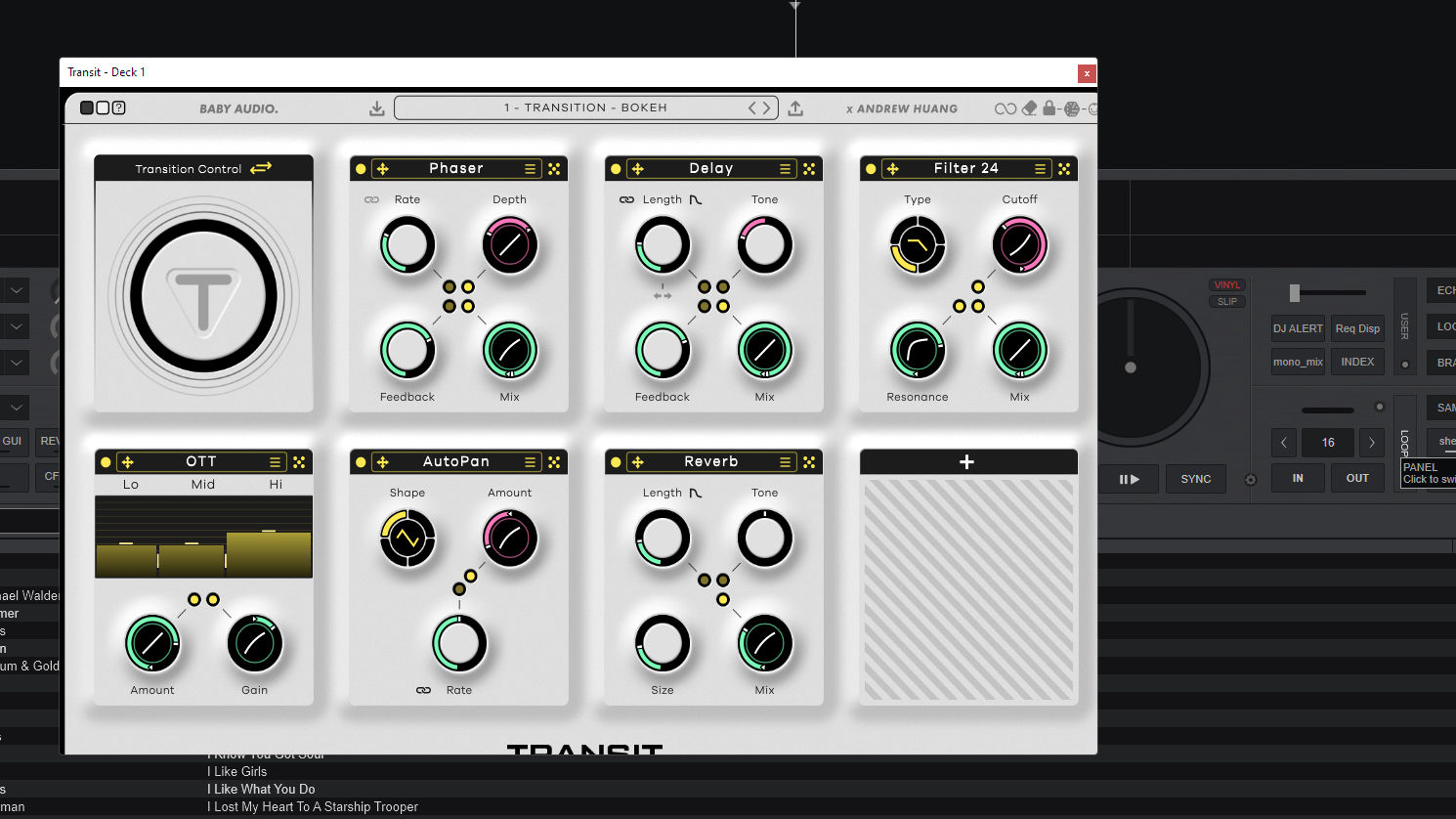
Should look like this:
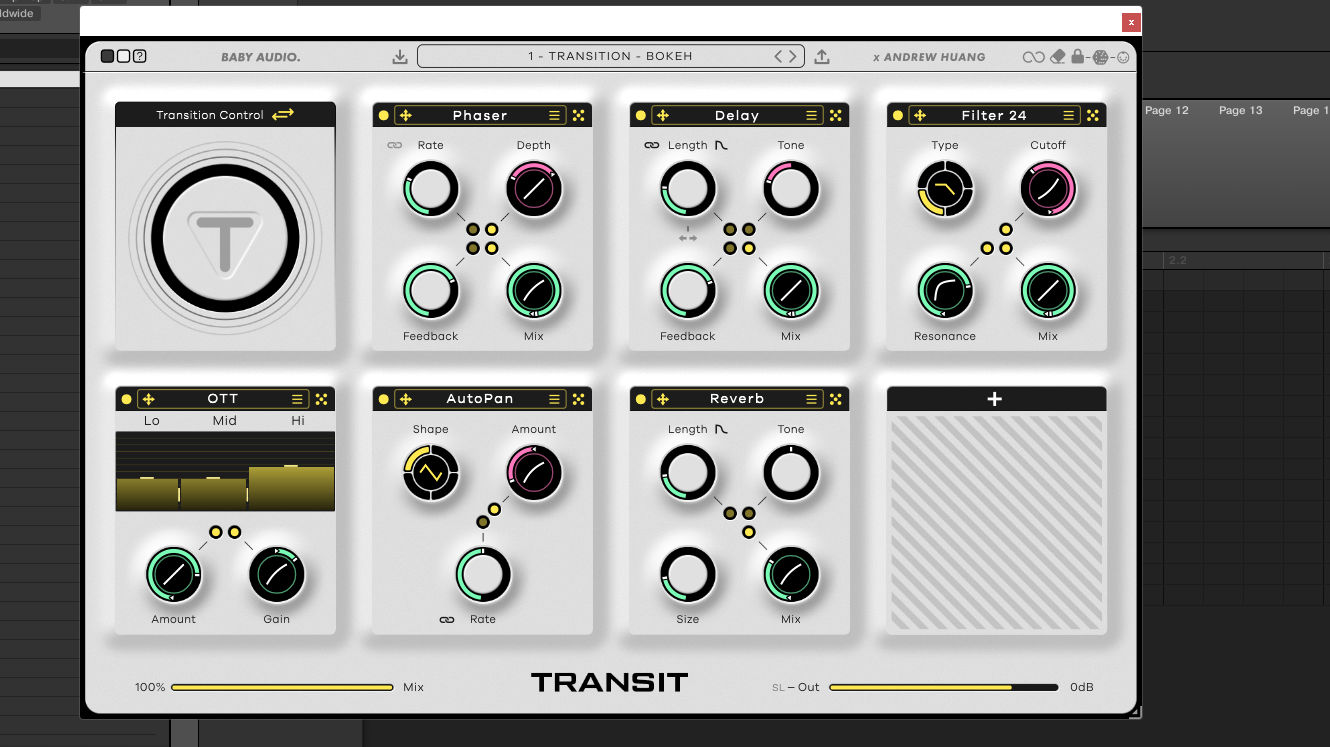
Should look like this:
Posted Mon 08 Dec 25 @ 10:09 am
 djcel
djcel
Which dpi do you use for your screen?
Can you test again with 100
Can you test again with 100
Posted Mon 08 Dec 25 @ 10:17 am
groovindj
This is a standard 1920x1080 HD screen with no scaling (set at 100%).
I know there are issues generally (across various software) with people using e.g. 4K screens and having to scale up - but this not the case here.
I know there are issues generally (across various software) with people using e.g. 4K screens and having to scale up - but this not the case here.
Posted Mon 08 Dec 25 @ 10:22 am
djcel
Ok so maybe not related to setContentScaleFactor this time.
https://steinbergmedia.github.io/vst3_doc/base/classSteinberg_1_1IPlugViewContentScaleSupport.html
https://steinbergmedia.github.io/vst3_doc/base/classSteinberg_1_1IPlugViewContentScaleSupport.html
Posted Mon 08 Dec 25 @ 10:48 am
 DJ Entrada
Example for me:
3840*2160, 200% scaling
Ozone 10 is very small, but at least displays correctly and can be resized.
Ozone 11 is bugged, the interface scales, but the VST isn't resizable.
VST scaling is a very awkward thing to get right. If you do it one way, you end up with half the VSTs wrong, and if you do it the other, the other half don't work. To do it well, you need to have options to choose which scaling mode (like some DAWs do), but maybe this is too much for VDJ.
Something I would actually be more interested in is working out how to use a VST as a colour/mixer effect. I know you already can, if you manually put the name of the VST in a command, but the problem is they're not really setup to be useful as a single knob control. Would be cool if you could somehow set the position of the other controls within the VST while using it as a mixer effect. For now I just have to use the FX banks instead, which I guess isn't that bad.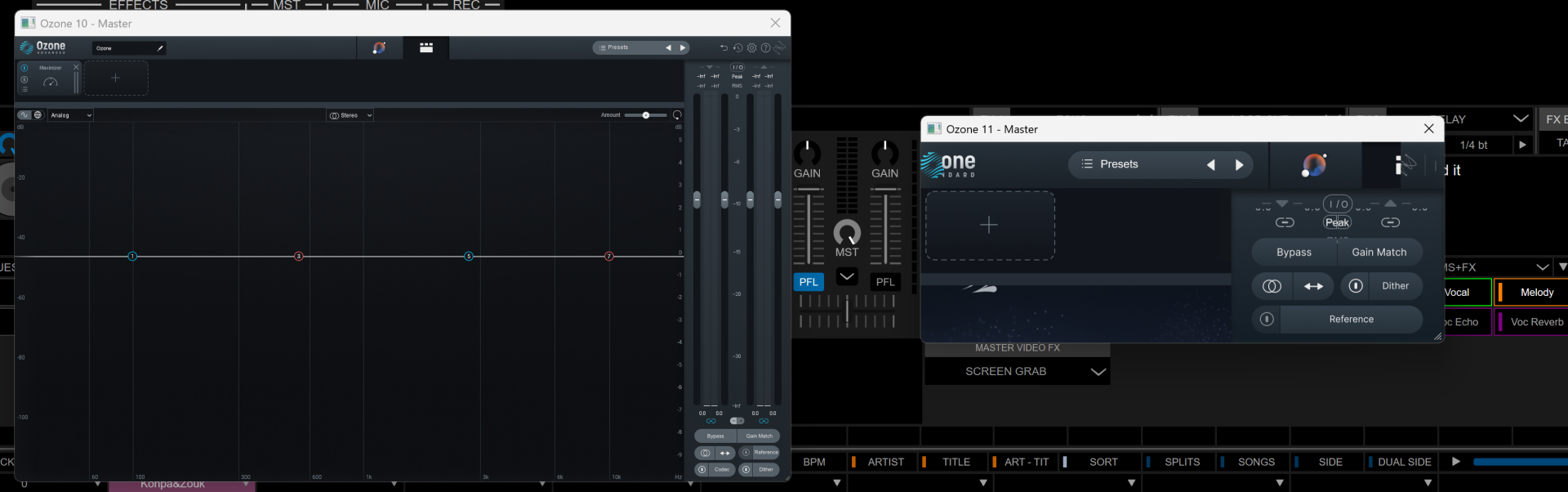
3840*2160, 200% scaling
Ozone 10 is very small, but at least displays correctly and can be resized.
Ozone 11 is bugged, the interface scales, but the VST isn't resizable.
VST scaling is a very awkward thing to get right. If you do it one way, you end up with half the VSTs wrong, and if you do it the other, the other half don't work. To do it well, you need to have options to choose which scaling mode (like some DAWs do), but maybe this is too much for VDJ.
Something I would actually be more interested in is working out how to use a VST as a colour/mixer effect. I know you already can, if you manually put the name of the VST in a command, but the problem is they're not really setup to be useful as a single knob control. Would be cool if you could somehow set the position of the other controls within the VST while using it as a mixer effect. For now I just have to use the FX banks instead, which I guess isn't that bad.
Posted Mon 08 Dec 25 @ 2:47 pm
Adion
Please try again with 8962
Posted Tue 16 Dec 25 @ 9:00 am
groovindj
Yes all seems well here now, having tried a few different VST and VSTi plugins.
One thing though, after selecting a VST, when I go back to select another, the dropdown is always reset, rather than being where I left it i.e. in the VST directory.
One thing though, after selecting a VST, when I go back to select another, the dropdown is always reset, rather than being where I left it i.e. in the VST directory.
Posted Tue 16 Dec 25 @ 11:22 am
Adion
Now that you can customize effect lists it's probably easier to sort the vst you want to use directly in a list, rather than a subfolder?
Posted Tue 16 Dec 25 @ 12:32 pm
groovindj
Thanks, I'll give that a try at some point.
Posted Tue 16 Dec 25 @ 12:44 pm
DJ Entrada
FYI Ozone 11 is still broken for me in 8962.
Not a huge issue for me, I can keep using 10, nothing new relevant in 11 for VDJ, just letting you know.
Not a huge issue for me, I can keep using 10, nothing new relevant in 11 for VDJ, just letting you know.
Posted Tue 16 Dec 25 @ 10:33 pm
Adion
It seems the current version is Ozone 12?
Edit: Tried, and Ozone 12 seems fine on Mac at least, will try Windows later
Edit: Tried, and Ozone 12 seems fine on Mac at least, will try Windows later
Posted Wed 17 Dec 25 @ 7:06 am
groovindj
Ozone 11 (standard) looks OK here. If the window is small, certain bits get cut off, but dragging the window open more, it all seems to appear correctly.
Windows 11 / 1920x1080 @ 100%
Windows 11 / 1920x1080 @ 100%
Posted Wed 17 Dec 25 @ 10:37 am
DJ Entrada
It won't let me stretch the window at all. It might be that it's ended up so small the stretch control is broken
Posted Wed 17 Dec 25 @ 5:28 pm
 PhantomDeejay
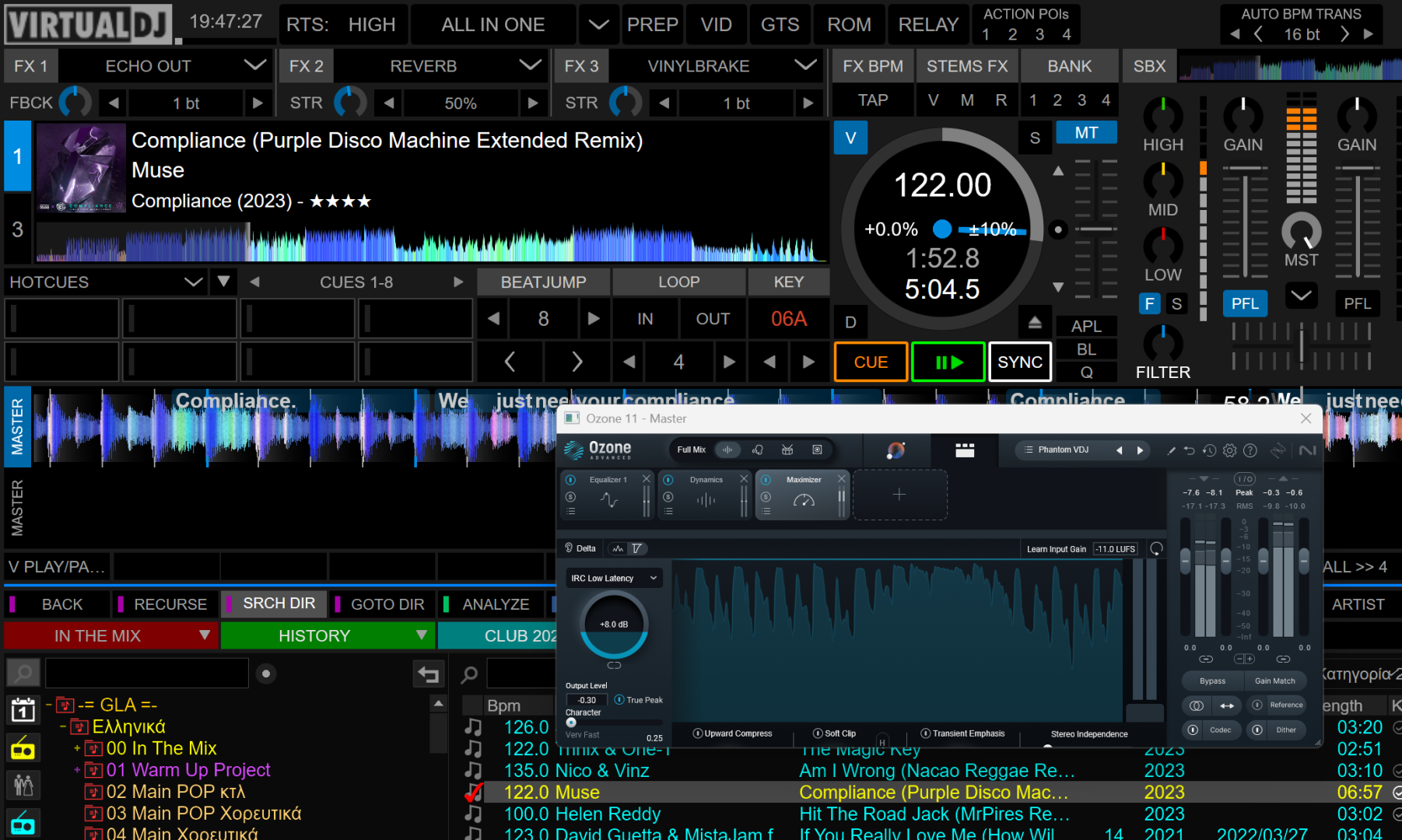
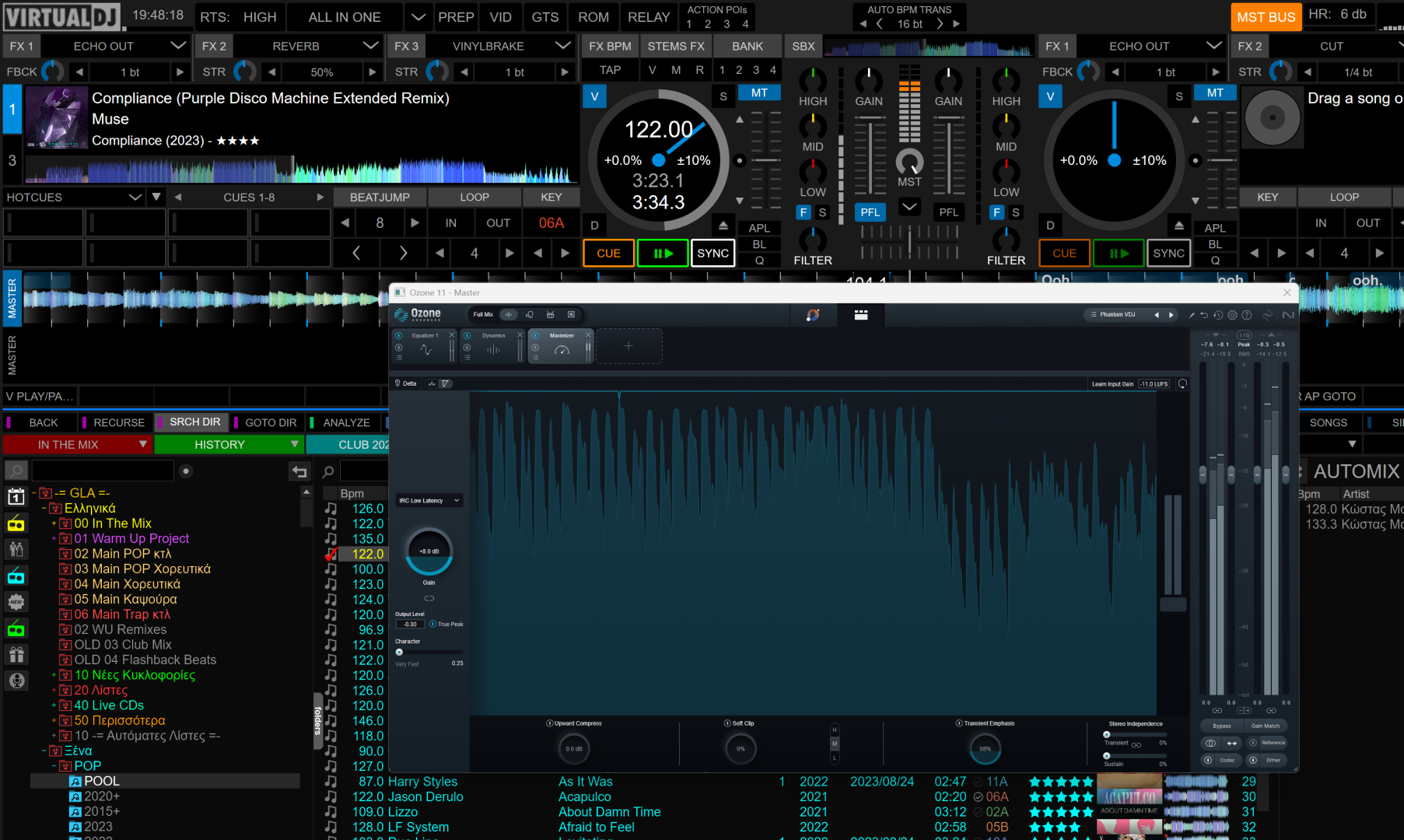
This is Ozone 11 on a 4K monitor running at 150% scaling.
The first image is the original size, the second is the max size I can get it to be.
It resizes but doesn't scale.
Posted Wed 17 Dec 25 @ 5:51 pm
 Pato Selekta
It’d be awesome if VirtualDJ skins could embed VST controls *inside* the skin instead of relying on the floating VST window.
The floating UI is a headache: the moment you click back on the skin, the VST window can drop behind it, and you end up hunting for it again.
Has anyone managed to do this (or something close)? Like a skin “bay/compartment” where the VST UI lives and stays on top / docked? Any examples or workarounds would be appreciated.
The floating UI is a headache: the moment you click back on the skin, the VST window can drop behind it, and you end up hunting for it again.
Has anyone managed to do this (or something close)? Like a skin “bay/compartment” where the VST UI lives and stays on top / docked? Any examples or workarounds would be appreciated.
Posted Sun 21 Dec 25 @ 2:12 pm
PhantomDeejay
You can do that, but it needs to be hardcoded to a particular VST
This means that if I create such a place for a given VST (let's say TDR Nova) on my skin and you want to use Ozone, controls won't "fit" / make sense.
So, there's no good work around this, as it involves making a new "GUI" on the skin for every VST effect a user has/wants to use.
Which means hundreds..
This means that if I create such a place for a given VST (let's say TDR Nova) on my skin and you want to use Ozone, controls won't "fit" / make sense.
So, there's no good work around this, as it involves making a new "GUI" on the skin for every VST effect a user has/wants to use.
Which means hundreds..
Posted Sun 21 Dec 25 @ 3:16 pm