


 AdiDgani
Hi,
I’m experiencing issues with the Echo Out effect in VirtualDJ and I’m unable to achieve a clean, professional result for transitions.
What I’m trying to do:
I want a simple Echo Out behavior where I press a pad on one deck, it captures the last spoken word (usually a vocal), creates a clean echo tail, and then the track stops while the echo continues for a short musical duration (around 8 beats). This should only affect the active deck, while I mix in a new track on the other deck.
The problems I’m encountering:
- The Echo Out effect often produces very loud distortion or feedback instead of a clean tail.
- Sometimes the effect is applied to both decks when the crossfader is centered, instead of only the active deck.
- In other cases, the original track keeps playing under the echo instead of stopping, which ruins the transition.
- When I try to use scripting (padfx / effect / wait), I either get a hard cut (the track drops instantly) or an echo that continues while the track still plays.
- I’m unable to get a clean “last word echo out” similar to standard DJ mixer behavior (like Pioneer DJM).
What I tried:
- Using padfx "echo out" with different parameters (e.g. 70%, 1bt)
- Using effect_active "echo" + pause
- Using wait 8bt to auto-stop the effect
- Using stems-based scripts (isolating vocals and applying echo)
- Disabling “mute source” and checking beat sync
None of these gave me a reliable, clean Echo Out transition.
Additional issue:
I would like to downgrade to a previous VirtualDJ version because I suspect this behavior changed in recent builds. However, I couldn’t access a reliable official archive of older builds, and some links seem unavailable or broken.
My questions:
1. What is the correct way to achieve a clean Echo Out transition (last word echo, track stops, echo tail continues naturally)?
2. Is Echo Out supposed to be a deck effect or master effect by default, and how can I force it to apply only to one deck?
3. What are the recommended parameters for Echo Out to avoid distortion?
4. Is there an official way to download and install previous builds of VirtualDJ?
Thank you in advance for your help.
I’m experiencing issues with the Echo Out effect in VirtualDJ and I’m unable to achieve a clean, professional result for transitions.
What I’m trying to do:
I want a simple Echo Out behavior where I press a pad on one deck, it captures the last spoken word (usually a vocal), creates a clean echo tail, and then the track stops while the echo continues for a short musical duration (around 8 beats). This should only affect the active deck, while I mix in a new track on the other deck.
The problems I’m encountering:
- The Echo Out effect often produces very loud distortion or feedback instead of a clean tail.
- Sometimes the effect is applied to both decks when the crossfader is centered, instead of only the active deck.
- In other cases, the original track keeps playing under the echo instead of stopping, which ruins the transition.
- When I try to use scripting (padfx / effect / wait), I either get a hard cut (the track drops instantly) or an echo that continues while the track still plays.
- I’m unable to get a clean “last word echo out” similar to standard DJ mixer behavior (like Pioneer DJM).
What I tried:
- Using padfx "echo out" with different parameters (e.g. 70%, 1bt)
- Using effect_active "echo" + pause
- Using wait 8bt to auto-stop the effect
- Using stems-based scripts (isolating vocals and applying echo)
- Disabling “mute source” and checking beat sync
None of these gave me a reliable, clean Echo Out transition.
Additional issue:
I would like to downgrade to a previous VirtualDJ version because I suspect this behavior changed in recent builds. However, I couldn’t access a reliable official archive of older builds, and some links seem unavailable or broken.
My questions:
1. What is the correct way to achieve a clean Echo Out transition (last word echo, track stops, echo tail continues naturally)?
2. Is Echo Out supposed to be a deck effect or master effect by default, and how can I force it to apply only to one deck?
3. What are the recommended parameters for Echo Out to avoid distortion?
4. Is there an official way to download and install previous builds of VirtualDJ?
Thank you in advance for your help.
Posted Sat 25 Apr 26 @ 10:44 am
 PhantomDeejay
1. You need to select the correct parameters and activate the effect on correct timing. Also keep in mind that you cannot always get a "clean" result depending on the track itself
2. It's supposed to be a deck effect. Therefore apply it on the deck, not on master
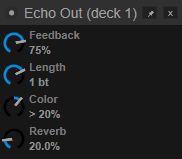
3. Personally I use around 70 to 75% feedback, 1 beat timing, >20% Color and 20% Reverb.
4. The official way to go "way back" is to ask support.
However I would not recommend that.
1) VirtualDJ 2026 brought major updates on effects engine with much better and many more native effects than before.
2) You can get the "old" effects behavior back by using the "Legacy" sound effects list.
3) Personally I would not suggest using "legacy" either. I believe it's more a matter of fine tuning the current effect to your taste and understanding it's limitations and when/how to use it.
As I said, I use it regularly with the settings mentioned above without any issue whatsoever!
2. It's supposed to be a deck effect. Therefore apply it on the deck, not on master
3. Personally I use around 70 to 75% feedback, 1 beat timing, >20% Color and 20% Reverb.
4. The official way to go "way back" is to ask support.
However I would not recommend that.
1) VirtualDJ 2026 brought major updates on effects engine with much better and many more native effects than before.
2) You can get the "old" effects behavior back by using the "Legacy" sound effects list.
3) Personally I would not suggest using "legacy" either. I believe it's more a matter of fine tuning the current effect to your taste and understanding it's limitations and when/how to use it.
As I said, I use it regularly with the settings mentioned above without any issue whatsoever!
Posted Sat 25 Apr 26 @ 11:12 am
AdiDgani
PhantomDeejay wrote :
1. You need to select the correct parameters and activate the effect on correct timing. Also keep in mind that you cannot always get a "clean" result depending on the track itself
2. It's supposed to be a deck effect. Therefore apply it on the deck, not on master
3. Personally I use around 70 to 75% feedback, 1 beat timing, >20% Color and 20% Reverb.
4. The official way to go "way back" is to ask support.
However I would not recommend that.
1) VirtualDJ 2026 brought major updates on effects engine with much better and many more native effects than before.
2) You can get the "old" effects behavior back by using the "Legacy" sound effects list.
3) Personally I would not suggest using "legacy" either. I believe it's more a matter of fine tuning the current effect to your taste and understanding it's limitations and when/how to use it.
As I said, I use it regularly with the settings mentioned above without any issue whatsoever!
2. It's supposed to be a deck effect. Therefore apply it on the deck, not on master
3. Personally I use around 70 to 75% feedback, 1 beat timing, >20% Color and 20% Reverb.
4. The official way to go "way back" is to ask support.
However I would not recommend that.
1) VirtualDJ 2026 brought major updates on effects engine with much better and many more native effects than before.
2) You can get the "old" effects behavior back by using the "Legacy" sound effects list.
3) Personally I would not suggest using "legacy" either. I believe it's more a matter of fine tuning the current effect to your taste and understanding it's limitations and when/how to use it.
As I said, I use it regularly with the settings mentioned above without any issue whatsoever!
This is is amazing, the problem is - i want it set this exact way (and sound) on my padfx - what cose should I write in the padfx? it used to be "deck active padfx "echo out" 70% 1bt" and it sounds like crap :/
Posted Sat 25 Apr 26 @ 11:25 am
PhantomDeejay
Try padfx 'echo out' 70% 70% 63% 20%
Posted Sat 25 Apr 26 @ 11:36 am
AdiDgani
PhantomDeejay wrote :
Try padfx 'echo out' 70% 70% 63% 20%
I think (hope!) I manged to fix it - thanks to you and chat gpt who I've worked 24/7 to teach it what i want. the correct code is:
deck active padfx "echo out" 75% 1bt & wait 64bt & deck active padfx "echo out" off
Posted Sat 25 Apr 26 @ 11:41 am
DJ Nate
I’m having a similar problem and customer support wasn’t really helpful. In any case, I want the echo out to behave like it does in Serato DJ. If I enable echo out and have the level/depth knob to zero it cuts out the music.
In Serato, you can enable any of the effects, but you don’t hear the effect until you increase the level depth knob. For the echo out, it slowly echos an will cut the audio or echo/loop the audio when the level depth knob is 50% or greater.
Does anyone know I can achieve that. The current VDJ echo out is really harsh and doesn’t provide a smooth and natural transition. Any suggestions would be greatly appreciated. Thank you.
In Serato, you can enable any of the effects, but you don’t hear the effect until you increase the level depth knob. For the echo out, it slowly echos an will cut the audio or echo/loop the audio when the level depth knob is 50% or greater.
Does anyone know I can achieve that. The current VDJ echo out is really harsh and doesn’t provide a smooth and natural transition. Any suggestions would be greatly appreciated. Thank you.
Posted Wed 03 Jun 26 @ 9:31 am
PhantomDeejay
So.. Serato's version of "Echo Out", behaves as an ECHO effect up to 50%
I wouldn't call that "expected" behavior either..
PS: Not all effects are suitable to be treated as "stand by" effects where they do "nothing" if dry/wet slider is set to 0% and then do "something" when dry/wet goes higher..
"Echo Out" is meant to generate a single "echo trail" and repeat it. It's not meant to "build" an echo trail.
If you want to "build" an echo trail, you can use the "Echo" effect.
The only difference is that in order to "remove" the track, you'll have to use the volume slider.
So, you use the echo effect to build your echo trail, and then either stop the track, or cut it's volume by the volume slider.
PPS: Also all the hardware versions of "Echo Out" I have tried (e.g. on Rane Gear) don't behave like your Serato description. They rather behave like the modern version of VirtualDJ's "Echo Out" version
I wouldn't call that "expected" behavior either..
PS: Not all effects are suitable to be treated as "stand by" effects where they do "nothing" if dry/wet slider is set to 0% and then do "something" when dry/wet goes higher..
"Echo Out" is meant to generate a single "echo trail" and repeat it. It's not meant to "build" an echo trail.
If you want to "build" an echo trail, you can use the "Echo" effect.
The only difference is that in order to "remove" the track, you'll have to use the volume slider.
So, you use the echo effect to build your echo trail, and then either stop the track, or cut it's volume by the volume slider.
PPS: Also all the hardware versions of "Echo Out" I have tried (e.g. on Rane Gear) don't behave like your Serato description. They rather behave like the modern version of VirtualDJ's "Echo Out" version
Posted Wed 03 Jun 26 @ 10:55 am
Benz Werner
Hi, I want to set up "Echo Out" for Deck 1 and Deck 2 with a single keypress, but not activate it.
Why doesn't the following work?
deck 1 setting 'echo out' 70% 1bt 20% 20% & deck 2 setting 'echo out' 70% 1bt 20% 20%
Why doesn't the following work?
deck 1 setting 'echo out' 70% 1bt 20% 20% & deck 2 setting 'echo out' 70% 1bt 20% 20%
Posted Wed 03 Jun 26 @ 1:37 pm
 locoDog
setting is a verb for 'options & settings' nothing else.
If you want to adjust effect params, it's one of; effect_slider, effect_beats, effect_button for each param you want to set
If you want to adjust effect params, it's one of; effect_slider, effect_beats, effect_button for each param you want to set
Posted Thu 04 Jun 26 @ 12:21 am
Benz Werner
These are the best settings for Echo Out, in my opinion.
Mod It's param_* SLOT/EFFECTNAME SLIDER/BUTTONNUM VALUE, you typed it out the wrong way, that would have only worked on slot 1
deck 1 effect_slider 'echo out' 1 70% & effect_slider 'echo out' 4 20% & effect_beats 'echo out' 1 & effect_slider 'echo out' 3 63% &
deck 2 effect_slider 'echo out' 1 70% & effect_slider 'echo out' 4 20% & effect_beats 'echo out' 1 & effect_slider 'echo out' 3 63%
Mod It's param_* SLOT/EFFECTNAME SLIDER/BUTTONNUM VALUE, you typed it out the wrong way, that would have only worked on slot 1
Posted Thu 04 Jun 26 @ 10:15 am
Benz Werner
Benz Werner wrote :
These are the best settings for Echo Out, in my opinion.
Mod It's param_* SLOT/EFFECTNAME SLIDER/BUTTONNUM VALUE, you typed it out the wrong way, that would have only worked on slot 1
deck 1 effect_slider 'echo out' 1 70% & effect_slider 'echo out' 4 20% & effect_beats 'echo out' 1 & effect_slider 'echo out' 3 63% &
deck 2 effect_slider 'echo out' 1 70% & effect_slider 'echo out' 4 20% & effect_beats 'echo out' 1 & effect_slider 'echo out' 3 63%
Mod It's param_* SLOT/EFFECTNAME SLIDER/BUTTONNUM VALUE, you typed it out the wrong way, that would have only worked on slot 1
I'm interested to know who the friendly helper is?
Unfortunately, I don't know anything about the slots yet; where can I find instructions on how to use them?
Posted Fri 05 Jun 26 @ 8:40 am
locoDog
Me this time, but generally if a script posted by a user is wrong it will be corrected by somebody with edit power.
Slots covered very early in scriptSchool timestamp Tue 29 May 18 @ 6:36 pm
If you put an effect in a slot you don't have to call it by name while it is in slot, you can call it by slot number, example;
effect_select 2 distortion & wait 1000ms & effect_active 2
Slots covered very early in scriptSchool timestamp Tue 29 May 18 @ 6:36 pm
If you put an effect in a slot you don't have to call it by name while it is in slot, you can call it by slot number, example;
effect_select 2 distortion & wait 1000ms & effect_active 2
Posted Fri 05 Jun 26 @ 9:13 am
Benz Werner
@Locodog, thanks !
Posted Fri 05 Jun 26 @ 9:51 am