


 TheBosh01
since downloading vdj 2026 i have transported all my playlists frm a previous version into the new folder in vdj ( why its changed from my documents to app data i'll never know)
when i look in the app data folder all the lists are there, but they will not show in the left hand panel in vdj. i've made sure i havre " full control" in all folders and in have reset root folders but its still not showing. i cant even cteate new playlists? any idea?
when i look in the app data folder all the lists are there, but they will not show in the left hand panel in vdj. i've made sure i havre " full control" in all folders and in have reset root folders but its still not showing. i cant even cteate new playlists? any idea?
Posted Mon 29 Dec 25 @ 8:28 am
 DJ VinylTouch
Based on the Wiki for transferring ti a new computer, the paths that VirtualDJ checks are as follows:

How to check the path VirtualDJ uses is described on the page too.
Based on your report, I assume you are on Windows and using a version of VirtualDJ probably older than 2023 - ensure that you are actually using the correct path (in %USERPROFILE%\AppData\Local\VirtualDJ), and that you backup + remove the contents of the old path.
Also, VirtualDJ has moved to the MyLists structure to represent all lists - one the most significant changes there is that Playlists and Virtual Folders have been merged (now just called a List Folder, and a Playlist is now a List Folder that has order/the order column), and that the entire structure is stored in a different parent folder (VirtualDJ\MyLists parent folder). If I remember correctly (anyone correct me if I'm wrong), VirtualDJ auto converts the old structure to the new one, but anything/any tool that's dependent on the old structure would need a setting set in VirtualDJ (browserShowLegacyM3UPlaylists = yes) to allow it to display the old structure for newer created List Folders with order.
With respect to this:
My guess would be that %USERPROFILE%\AppData is considered the standard location for application-specific configuration data/settings, while %USERPROFILE%\Documents is really just a general storage location for Documents.
I think a similar change, for a similar reason, was made on MacOS too.
How to check the path VirtualDJ uses is described on the page too.
Based on your report, I assume you are on Windows and using a version of VirtualDJ probably older than 2023 - ensure that you are actually using the correct path (in %USERPROFILE%\AppData\Local\VirtualDJ), and that you backup + remove the contents of the old path.
Also, VirtualDJ has moved to the MyLists structure to represent all lists - one the most significant changes there is that Playlists and Virtual Folders have been merged (now just called a List Folder, and a Playlist is now a List Folder that has order/the order column), and that the entire structure is stored in a different parent folder (VirtualDJ\MyLists parent folder). If I remember correctly (anyone correct me if I'm wrong), VirtualDJ auto converts the old structure to the new one, but anything/any tool that's dependent on the old structure would need a setting set in VirtualDJ (browserShowLegacyM3UPlaylists = yes) to allow it to display the old structure for newer created List Folders with order.
With respect to this:
TheBosh01 wrote :
since downloading vdj 2026 i have transported all my playlists frm a previous version into the new folder in vdj ( why its changed from my documents to app data i'll never know)
My guess would be that %USERPROFILE%\AppData is considered the standard location for application-specific configuration data/settings, while %USERPROFILE%\Documents is really just a general storage location for Documents.
I think a similar change, for a similar reason, was made on MacOS too.
Posted Mon 29 Dec 25 @ 12:56 pm
Adion
Usually there's no need to guess paths yourself though.
Either use the built-in backup and restore functionality, or press the Cog in options to open the correct folder.
Either use the built-in backup and restore functionality, or press the Cog in options to open the correct folder.
Posted Mon 29 Dec 25 @ 1:15 pm
TheBosh01
DJ VinylTouch wrote :
Based on the Wiki for transferring ti a new computer, the paths that VirtualDJ checks are as follows:
How to check the path VirtualDJ uses is described on the page too.
Based on your report, I assume you are on Windows and using a version of VirtualDJ probably older than 2023 - ensure that you are actually using the correct path (in %USERPROFILE%\AppData\Local\VirtualDJ), and that you backup + remove the contents of the old path.
Also, VirtualDJ has moved to the MyLists structure to represent all lists - one the most significant changes there is that Playlists and Virtual Folders have been merged (now just called a List Folder, and a Playlist is now a List Folder that has order/the order column), and that the entire structure is stored in a different parent folder (VirtualDJ\MyLists parent folder). If I remember correctly (anyone correct me if I'm wrong), VirtualDJ auto converts the old structure to the new one, but anything/any tool that's dependent on the old structure would need a setting set in VirtualDJ (browserShowLegacyM3UPlaylists = yes) to allow it to display the old structure for newer created List Folders with order.
With respect to this:
My guess would be that %USERPROFILE%\AppData is considered the standard location for application-specific configuration data/settings, while %USERPROFILE%\Documents is really just a general storage location for Documents.
I think a similar change, for a similar reason, was made on MacOS too.
How to check the path VirtualDJ uses is described on the page too.
Based on your report, I assume you are on Windows and using a version of VirtualDJ probably older than 2023 - ensure that you are actually using the correct path (in %USERPROFILE%\AppData\Local\VirtualDJ), and that you backup + remove the contents of the old path.
Also, VirtualDJ has moved to the MyLists structure to represent all lists - one the most significant changes there is that Playlists and Virtual Folders have been merged (now just called a List Folder, and a Playlist is now a List Folder that has order/the order column), and that the entire structure is stored in a different parent folder (VirtualDJ\MyLists parent folder). If I remember correctly (anyone correct me if I'm wrong), VirtualDJ auto converts the old structure to the new one, but anything/any tool that's dependent on the old structure would need a setting set in VirtualDJ (browserShowLegacyM3UPlaylists = yes) to allow it to display the old structure for newer created List Folders with order.
With respect to this:
TheBosh01 wrote :
since downloading vdj 2026 i have transported all my playlists frm a previous version into the new folder in vdj ( why its changed from my documents to app data i'll never know)
My guess would be that %USERPROFILE%\AppData is considered the standard location for application-specific configuration data/settings, while %USERPROFILE%\Documents is really just a general storage location for Documents.
I think a similar change, for a similar reason, was made on MacOS too.
Hi Vinyltouch,
Thanks for your help..
ive followed the pathway that VDJ gives you in settings / options / settings cog, and i do believe its the correct folder, the playlist folder is there ( see image 2 ) but its still not showing in the window of VDJ, i cant even expand the "my lists " folder. ( see image 3) . i have no idea what i'm doing wrong?


Posted Mon 29 Dec 25 @ 6:52 pm
DJ VinylTouch
Did you copy and delete the old folder contents?
What's the contents of the MyLists folder in that location?
Are any songs on an External Drive?
What's the contents of the MyLists folder in that location?
Are any songs on an External Drive?
Posted Mon 29 Dec 25 @ 7:36 pm
TheBosh01
DJ VinylTouch wrote :
Did you copy and delete the old folder contents?
What's the contents of the MyLists folder in that location?
Are any songs on an External Drive?
What's the contents of the MyLists folder in that location?
Are any songs on an External Drive?
unfortunatley i deleted the entirity of the previous version, it kept crashing so i think it was corrupt. the only thing i kept was a back up of all the playlists.
i have copied the playlist folder into the new VDJ folder and i have also ( since i read your post) copied them all into the MYFILES folder..... they are still not showing.
Posted Mon 29 Dec 25 @ 7:45 pm
DJ VinylTouch
So you may have created a bit of a mess there - the key was to keep a backup of the original folder structure in case things didn't work, so that you had something to go back to.
Are there any backups in the Backup folder?
If so, you could probably try doing a Restore of the most recent one.
If not, you can probably try recreating the folder structure you have in the old location, and then read through and following the instructions on the transfer page (yes, treat this as a new PC transfer, and see the special note about settings.xml at the bottom of the page).
https://virtualdj.com/wiki/How%20to%20Transfer%20To%20A%20New%20Computer.html
Are there any backups in the Backup folder?
If so, you could probably try doing a Restore of the most recent one.
If not, you can probably try recreating the folder structure you have in the old location, and then read through and following the instructions on the transfer page (yes, treat this as a new PC transfer, and see the special note about settings.xml at the bottom of the page).
https://virtualdj.com/wiki/How%20to%20Transfer%20To%20A%20New%20Computer.html
Posted Mon 29 Dec 25 @ 8:06 pm
TheBosh01
Actually, i've just discovered the old version was still sitting in the recycle bin, i've restored it and there does seem to be a backup folder ( see image), just not sure what to do with it...lol.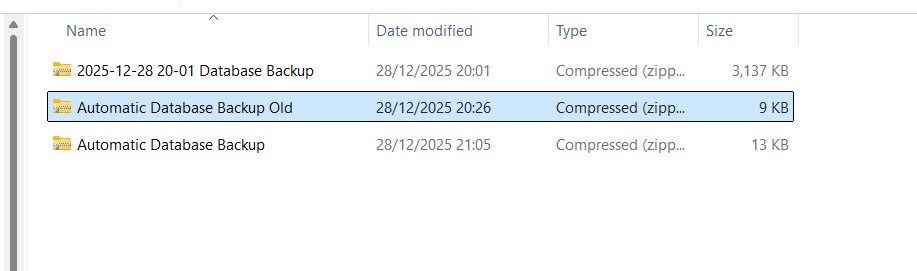
ooops...forget that, just realised it was a copy of the new version, i installed it twice when i thought it wasnt working.....
i'm afraid i didnt really understand all that about transfrering to a new computer ( i'm not thick but i have my limits..lol ) so looks like i may have to create a new set of lists......this may take a while....
thanks for your help
Rob
ooops...forget that, just realised it was a copy of the new version, i installed it twice when i thought it wasnt working.....
i'm afraid i didnt really understand all that about transfrering to a new computer ( i'm not thick but i have my limits..lol ) so looks like i may have to create a new set of lists......this may take a while....
thanks for your help
Rob
Posted Mon 29 Dec 25 @ 8:21 pm
DJ VinylTouch
Np, a little unfortunate but if you can reconstruct then it might be the only way to go.
In future - always make and keep backups before doing manual changes, it could save a lot of time.
In future - always make and keep backups before doing manual changes, it could save a lot of time.
Posted Mon 29 Dec 25 @ 9:16 pm