


 Sepatro
I have turned off al this ridicious match key stuff etc, still it increases the key to match the key on the other deck? Any suggestions?
Posted Sat 22 Mar 25 @ 11:55 am
Adion
autoKey and resetKeyOnLoad are the only options that affect the key on loading a song
Perhaps you turned off masterTempo? Without master tempo the key would change if the speed of the song is increased due to bpm matching for example.
Perhaps you turned off masterTempo? Without master tempo the key would change if the speed of the song is increased due to bpm matching for example.
Posted Sat 22 Mar 25 @ 12:05 pm
Sepatro
Adion wrote :
autoKey and resetKeyOnLoad are the only options that affect the key on loading a song
Perhaps you turned off masterTempo? Without master tempo the key would change if the speed of the song is increased due to bpm matching for example.
Perhaps you turned off masterTempo? Without master tempo the key would change if the speed of the song is increased due to bpm matching for example.
Well, autoKey is off, and resetKeyOnLoad is on. Mastertempo is also on. I don't understand, it never behaved like this in the past...
Posted Sun 23 Mar 25 @ 4:53 pm
Sepatro
Any idea? I have a recording. This is really becoming annoying (but can't upload video's here?).
VDJ adjusts the key +1, -1, .... and I really don't want this. Drives me crazy.
VDJ adjusts the key +1, -1, .... and I really don't want this. Drives me crazy.
Posted Sun 30 Mar 25 @ 2:24 pm
 DJ VinylTouch
As said before, autoKey is the only setting off top that makes VirtualDJ do that (don't think that is on by default).
Something to try - backup your settings.xml, then remove it (= fresh install in terms of settings), check that autoKey is off in settings, then see if the problem still persists. If not, then it is a problem with your recorded setttings.
I've had a similar problem with the master tempo setting before (seemed to not matter/be reflected), and I had to get the application to recreate a new settings.xml and then add back all my settings (I did it via a diff of the settings.xml direct).
Something to try - backup your settings.xml, then remove it (= fresh install in terms of settings), check that autoKey is off in settings, then see if the problem still persists. If not, then it is a problem with your recorded setttings.
I've had a similar problem with the master tempo setting before (seemed to not matter/be reflected), and I had to get the application to recreate a new settings.xml and then add back all my settings (I did it via a diff of the settings.xml direct).
Posted Sun 30 Mar 25 @ 2:40 pm
Sepatro
But i am trying to figure out which settings it could be then? Either there are still other settings that change the key (other than you and Adion mentioned), or it is a bug.
Posted Sun 30 Mar 25 @ 2:56 pm
Sepatro
By the way, I tried your suggestion (deleting the Settings.xml) and that DID work, thanks for the suggestion!
Still a mess of course now trying to get all settings back...
Still a mess of course now trying to get all settings back...
Posted Sun 30 Mar 25 @ 3:03 pm
DJ VinylTouch
It's a start at diagnosing the problem.
There is no other setting, AFAIK, other than the two mentioned, that makes VirtualDJ do this automatically, and it doesn't happen at least on my end.
I'm also saying that I've had settings not be respected before and how I solved it. It could be a bug (one of the reasons why the backup is important). It's at least a start instead of speaking about a setting that you think is still affecting the process - @Adion is pretty much saying there is no other setting doing that.
I think there is something that affects the writing out/processing of the settings.xml in certain cases (like everything up to a point is respected and then after they aren't) - send them that backed up settings.xml so they can get to the bottom of it because it's a pain to reconstruct the settings (as you are going through now), and in my case, I pretty much never touched the settings.xml file directly outside of the initial reconstruction.
There is no other setting, AFAIK, other than the two mentioned, that makes VirtualDJ do this automatically, and it doesn't happen at least on my end.
I'm also saying that I've had settings not be respected before and how I solved it. It could be a bug (one of the reasons why the backup is important). It's at least a start instead of speaking about a setting that you think is still affecting the process - @Adion is pretty much saying there is no other setting doing that.
I think there is something that affects the writing out/processing of the settings.xml in certain cases (like everything up to a point is respected and then after they aren't) - send them that backed up settings.xml so they can get to the bottom of it because it's a pain to reconstruct the settings (as you are going through now), and in my case, I pretty much never touched the settings.xml file directly outside of the initial reconstruction.
Posted Sun 30 Mar 25 @ 3:05 pm
Sepatro
Yes, thanks. Anyway, it works now, but will be some reconstruction work for the other settings :). I managed to copy some parts of the .xml file, but still ...
Posted Sun 30 Mar 25 @ 3:53 pm
 djles.co.uk
One thing that many miss is smart_play. I have a custom key combination that I use during a gig to switch smart_play ON for beat matching and switching it OFF to stop beat matching.
Check your DECK OPTIONS MENU as below.
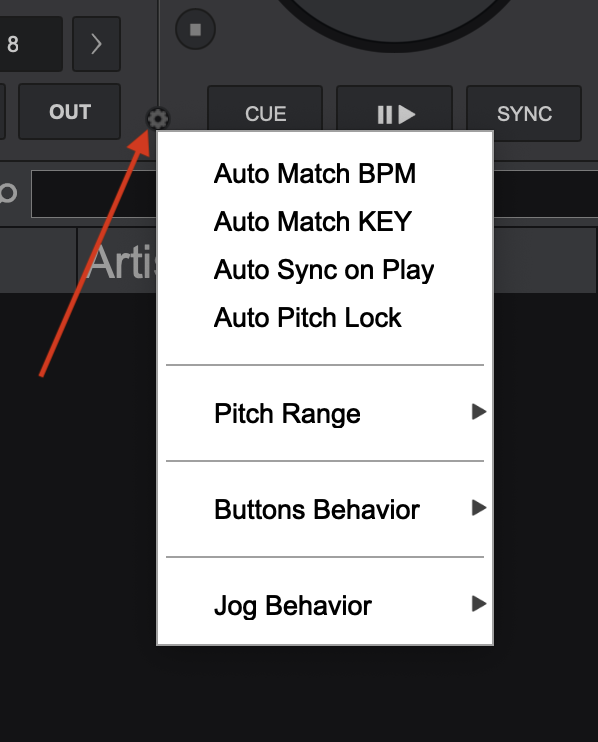
Check your DECK OPTIONS MENU as below.
Posted Mon 31 Mar 25 @ 8:34 am
 PhantomDeejay
Smart_Play will NOT alter the key of a track.
Posted Tue 01 Apr 25 @ 9:16 am
djles.co.uk
Surely smart_play would change the key if Master Tempo was switched off as Adion mentioned previously in this thread. If smart_play was accidentally left on from a previous mix, it could have the effect that the OP has mentioned. I've had this happen if I forget during beat mixing as I switch mine on and off manually with custom buttons during mixing. I usually have MT on permanently.
Posted Tue 01 Apr 25 @ 7:55 pm
PhantomDeejay
djles.co.uk wrote :
Surely smart_play would change the key if Master Tempo was switched off as Adion mentioned previously in this thread. If smart_play was accidentally left on from a previous mix, it could have the effect that the OP has mentioned.
Sepatro wrote :
VDJ adjusts the key +1, -1, .... and I really don't want this. Drives me crazy.
No. Nope.
Smart play will adjust the pitch of the track (so that BPM matches) and if master tempo is off, this means that the key will get altered.
However, the display will still show the original track's key, and not a semitone up/down (+1/-1) as the user claims.
I would not insist on this if it wasn't for the fact that we're looking to find what's wrong for the user, and smart_play is a wrong route to follow.
Literally, autokey setting is the only thing that should alter the key.
If it's not autokey then it may be an action on a custom script / mapper that's causing this.
E.g. the keyboard mapper is using match_key or key_match_button on the ONSONGLOAD key.
Or the user has a repeat script running that's causing such a behavior.
Or the user accidentally remapped a button on his controller and the load button is now using load & key_match_button instead of just load (as an example)
Posted Tue 01 Apr 25 @ 9:10 pm