


 dglito
Bonjour à tous! Dans les options de Virtual DJ, j'ai touché aux settings du Jog Sensivity (Scratch, Cue, Bend) mais je voudrais les remettre à leurs valeurs par défaut, comment faire? J'étais habitué avec les paramètres d'origines. Si vous pouvez m'aider ça serait grandement apprécié :)
J'aimerais commencer à scratcher avec la console RMX, je sais qu'elle n'est pas fait pour ça mais tout de même ça fait un bel effet, surtout en Hip-Hop pour entrer une chanson. En fait j'ai touché à ce setting croyant qu'après mon Scratch, la chanson se synchroniserait immédiatement avec le carré le plus près, mais ce n'est pas le cas, avez-vous une autre solution? Sans avoir à appuyer sur Sync, que la pièce ce place immédiatement en Sync en lancant le morceaux?
Merci!
J'aimerais commencer à scratcher avec la console RMX, je sais qu'elle n'est pas fait pour ça mais tout de même ça fait un bel effet, surtout en Hip-Hop pour entrer une chanson. En fait j'ai touché à ce setting croyant qu'après mon Scratch, la chanson se synchroniserait immédiatement avec le carré le plus près, mais ce n'est pas le cas, avez-vous une autre solution? Sans avoir à appuyer sur Sync, que la pièce ce place immédiatement en Sync en lancant le morceaux?
Merci!
Posted Mon 05 Oct 09 @ 2:46 pm
 LIMOL
LIMOL
1) Tu vas l'oglet infos et tu clic sur réinitialiser les réglage par défaut.
2) Moi j'ai mis dans action:
deck 1 play_pause & sync
deck 2 play_pause & sync
2) Moi j'ai mis dans action:
deck 1 play_pause & sync
deck 2 play_pause & sync
Posted Mon 05 Oct 09 @ 3:29 pm
dglito
Hey Un grand merci Limol! Je vais règler ça!
Posted Mon 05 Oct 09 @ 3:44 pm
 djcel
djcel
Vous pouvez aussi utiliser:
https://virtualdj.com/addons/2170/Registry_Tool.html
https://virtualdj.com/addons/2170/Registry_Tool.html
wiki wrote :
JogSensitivityBend: [max=512] JogSensitivityBend = value/2048
By default 128 => in bend mode, song playing, the wheel ratio is 1:16 (16 turns of the wheel backward while the vinyl on the skin would turn once will make the song stall)
JogSensitivityCue: [max=4096] JogSensitivityCue = value/2048
By default 512 => if the song is paused (cueing mode), whatever the vinyl-mode setting, the wheel ratio is 1:4 (4 turns of the wheel makes the vinyl on the skin turn once)
JogSensitivityScratch: [max=4096] JogSensitivityScratch = value/2048
By default 2048 => in scratch mode, song playing, the wheel ratio is 1:1 (one turn of the wheel makes one turn of the vinyl on the skin)
By default 128 => in bend mode, song playing, the wheel ratio is 1:16 (16 turns of the wheel backward while the vinyl on the skin would turn once will make the song stall)
JogSensitivityCue: [max=4096] JogSensitivityCue = value/2048
By default 512 => if the song is paused (cueing mode), whatever the vinyl-mode setting, the wheel ratio is 1:4 (4 turns of the wheel makes the vinyl on the skin turn once)
JogSensitivityScratch: [max=4096] JogSensitivityScratch = value/2048
By default 2048 => in scratch mode, song playing, the wheel ratio is 1:1 (one turn of the wheel makes one turn of the vinyl on the skin)
Posted Mon 05 Oct 09 @ 5:24 pm
LIMOL
Ou encore aller dans le registre pour mettre les valeurs par défaut, en appuyant sur la touche du clavier windows+R et tu tapes dans la fenetre exécuter regédit
En suite clic sur + HKEY_CURRENT_USER\Software\VirtualDJ
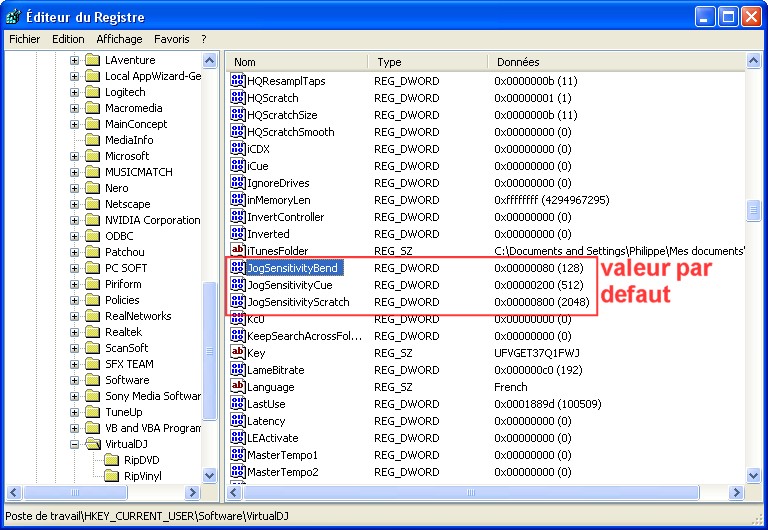
Pour modifier la valeur clic droit sur JogSensitivityBend -> clic sur modifier -> sélectionner décimale
et modifier la valeur en mettent 128
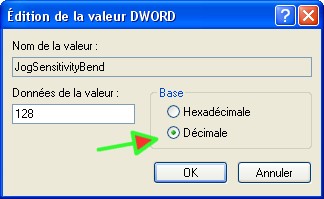
Pour modifier la valeur clic droit sur JogSensitivityCue -> clic sur modifier -> sélectionner décimale
et mofier la valeur en mettent 512
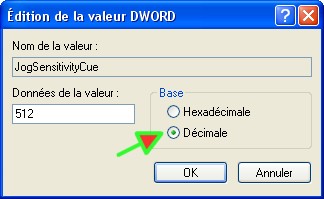
Pour modifier la valeur clic droit sur JogSensitivityScratch -> clic sur modifier -> sélectionner décimale
et mofier la valeur en mettent 2048
En suite clic sur + HKEY_CURRENT_USER\Software\VirtualDJ
Pour modifier la valeur clic droit sur JogSensitivityBend -> clic sur modifier -> sélectionner décimale
et modifier la valeur en mettent 128
Pour modifier la valeur clic droit sur JogSensitivityCue -> clic sur modifier -> sélectionner décimale
et mofier la valeur en mettent 512
Pour modifier la valeur clic droit sur JogSensitivityScratch -> clic sur modifier -> sélectionner décimale
et mofier la valeur en mettent 2048
Posted Mon 05 Oct 09 @ 6:21 pm