


 MacGyverGear
Hello Development team,
Most of the DJ's run their lights synchronised. OS2l is a perfect source. Beat clock is always is sync. But bot every software is compatible with this protocol.
Midi Clock is quite populair in music production. Virtual DJ can handle this too an Mof the DMX software can synchronise trough this Midi signal.
Tonight I noticed that the OS2l beat triggers and Midi Clock triggers sent out of Virtual DJ can be totally different and out of sync.
Please watch this short video I just made: https://youtu.be/xH-lICppaLc
Most of the DJ's run their lights synchronised. OS2l is a perfect source. Beat clock is always is sync. But bot every software is compatible with this protocol.
Midi Clock is quite populair in music production. Virtual DJ can handle this too an Mof the DMX software can synchronise trough this Midi signal.
Tonight I noticed that the OS2l beat triggers and Midi Clock triggers sent out of Virtual DJ can be totally different and out of sync.
Please watch this short video I just made: https://youtu.be/xH-lICppaLc
Posted Wed 01 Apr 26 @ 9:30 pm
 Adion
Adion
Midi Clock only sends the tempo, it does not contain any timing information
Posted Thu 02 Apr 26 @ 5:50 am
MacGyverGear
Adion wrote :
Midi Clock only sends the tempo, it does not contain any timing information
Thank you ADION, that explains everything. As a producer I used many musical instruments (drumcomputers, seqeuncers).. but I wasn't aware of this. That's why you guys developed OS2l of course.
There was already an Feature Request added at the Daslight forum. I just bought their DVC gold interface, but I should've done some research.. :( https://forum.daslight.com/viewtopic.php?t=9090
In fact their Wolfmix DMX controller listens perfectly to the beats transmitted over OS2l, don't know why they're just keep the Daslight users waiting.
Thanks!!
Posted Thu 02 Apr 26 @ 9:44 am
Adion
Something else that does exist is midi timecode, which does contain timing information, but for something like virtualdj it's less clear what the starting time should be (count from song start, or continue counting indefinitely, ...)
Something else you could check is Ableton Link. I don't know if there's any dmx software that uses this though, but it is another option that VDJ supports to transmit timing information.
Something else you could check is Ableton Link. I don't know if there's any dmx software that uses this though, but it is another option that VDJ supports to transmit timing information.
Posted Thu 02 Apr 26 @ 10:22 am
 groovindj
Google tells me DMXDesktop can use Ableton Link.
Lightjams and SoundSwitch are also listed on Ableton's Link page.
Lightjams and SoundSwitch are also listed on Ableton's Link page.
Posted Thu 02 Apr 26 @ 10:35 am
MacGyverGear
Hi,
Thanks for the replies and options. Daslight supports Abletonlink too. Will investigate this option on how it behaves and post my findings then.
Back in the days I started with DMX I used "Freestyler". There where a few 'extensions' available in Virtual DJ and worked perfectly in sync with the analysed BPM and beats by Virtual DJ. But I don't want to spend more time with this program.
Thanks for the replies and options. Daslight supports Abletonlink too. Will investigate this option on how it behaves and post my findings then.
Back in the days I started with DMX I used "Freestyler". There where a few 'extensions' available in Virtual DJ and worked perfectly in sync with the analysed BPM and beats by Virtual DJ. But I don't want to spend more time with this program.
Posted Thu 02 Apr 26 @ 11:59 am
MacGyverGear
Finally was in the time to get familiar with Daslight, program some Chases and do several tests synced with Virtual DJ through Ableton Link.
It performs much better than Midi Sync. Looks like Chases will sometimes skip the first beat and run out of sync, even when the first beat is in Daslight.
Synced by AbletonLink this problem doesn't occur.
In my test I used a great track from Earth Wind and Fire. human BPM. Fluid Beatgrid is always spot on. Even corrects the count after a sophisticated break and gets back on the first Beat. Impressive.
On the long run Daslight (or AbletonLink) seems to lose the grid /count. (watch it happen around 2:10-2:30). Don't know why.. I have to correct manually then. Select a different Chase.. (Video below):
https://youtu.be/gn2rNjNUjSM (sorry for the bright lights).
When playing computerised BPM (Drumcomputer /DAW produced) the AbletonLink will stay in sync.
When playing Humanised BPM, I don't know if the problem is in Ableton or Daslight. The BPM in the Virtual DJ player and the BPM in Dashlight is equal all the time.
Anyway. For now I'll continue with AbletonLink, and hopefully Daslight will add OS2l in the future.
It performs much better than Midi Sync. Looks like Chases will sometimes skip the first beat and run out of sync, even when the first beat is in Daslight.
Synced by AbletonLink this problem doesn't occur.
In my test I used a great track from Earth Wind and Fire. human BPM. Fluid Beatgrid is always spot on. Even corrects the count after a sophisticated break and gets back on the first Beat. Impressive.
On the long run Daslight (or AbletonLink) seems to lose the grid /count. (watch it happen around 2:10-2:30). Don't know why.. I have to correct manually then. Select a different Chase.. (Video below):
https://youtu.be/gn2rNjNUjSM (sorry for the bright lights).
When playing computerised BPM (Drumcomputer /DAW produced) the AbletonLink will stay in sync.
When playing Humanised BPM, I don't know if the problem is in Ableton or Daslight. The BPM in the Virtual DJ player and the BPM in Dashlight is equal all the time.
Anyway. For now I'll continue with AbletonLink, and hopefully Daslight will add OS2l in the future.
Posted Sun 05 Apr 26 @ 8:16 pm
MacGyverGear
Tonight I did some more tests with AbletonLink and made another video by syncing a DAW instead of Daslight.
In the end of the video I tested Daslight synced to that same DAW which performed without any problem.
https://youtu.be/TLf5Drd7WK4
I'm aware AbletonLink operates as a sort separate cycling clock.. For example, an Akai MPC (later generation supports the protocol too and will starts delayed, after the AbletonLink Cycle starts again. That's totally different for Virtual DJ, this will start on demand. But apart from that the synchronisation seems off.
Maybe this is because of the Fluid Beat Grid which will give various BPM when selected?
In the end of the video I tested Daslight synced to that same DAW which performed without any problem.
https://youtu.be/TLf5Drd7WK4
I'm aware AbletonLink operates as a sort separate cycling clock.. For example, an Akai MPC (later generation supports the protocol too and will starts delayed, after the AbletonLink Cycle starts again. That's totally different for Virtual DJ, this will start on demand. But apart from that the synchronisation seems off.
Maybe this is because of the Fluid Beat Grid which will give various BPM when selected?
Posted Tue 07 Apr 26 @ 10:14 pm
MacGyverGear
While typing above I attempted to do the same test to the same track. But now I set the BPM to 'Rigid' instead of the Fluid Beat Grid. Results: https://youtu.be/v-bJvi47_ao
Long story short: now the synchronisation between Virtual DJ and the DAW behaves as it should be. But the Beats are all off.. (as expected with these kind of tracks).
Long story short: now the synchronisation between Virtual DJ and the DAW behaves as it should be. But the Beats are all off.. (as expected with these kind of tracks).
Posted Tue 07 Apr 26 @ 10:34 pm
MacGyverGear
Adion wrote :
Something else you could check is Ableton Link. I don't know if there's any dmx software that uses this though, but it is another option that VDJ supports to transmit timing information.
Just to get this to the attention, a Short version of the three last test reports of Ableton link in this topic:
I Tested Daslight synced to Virtual DJ through Ableton link. This performs very well with the beatgrid set to 'Rigid'.
When using the 'Fluid Beat Grid', and BPM is various, Ableton link does not synchronise Daslight or a DAW. To me it seems Ableton link does yet not follow the Beat triggers provided by the latest Fluid Beat Grid upgrade.
Posted Wed 08 Apr 26 @ 7:47 pm
Adion
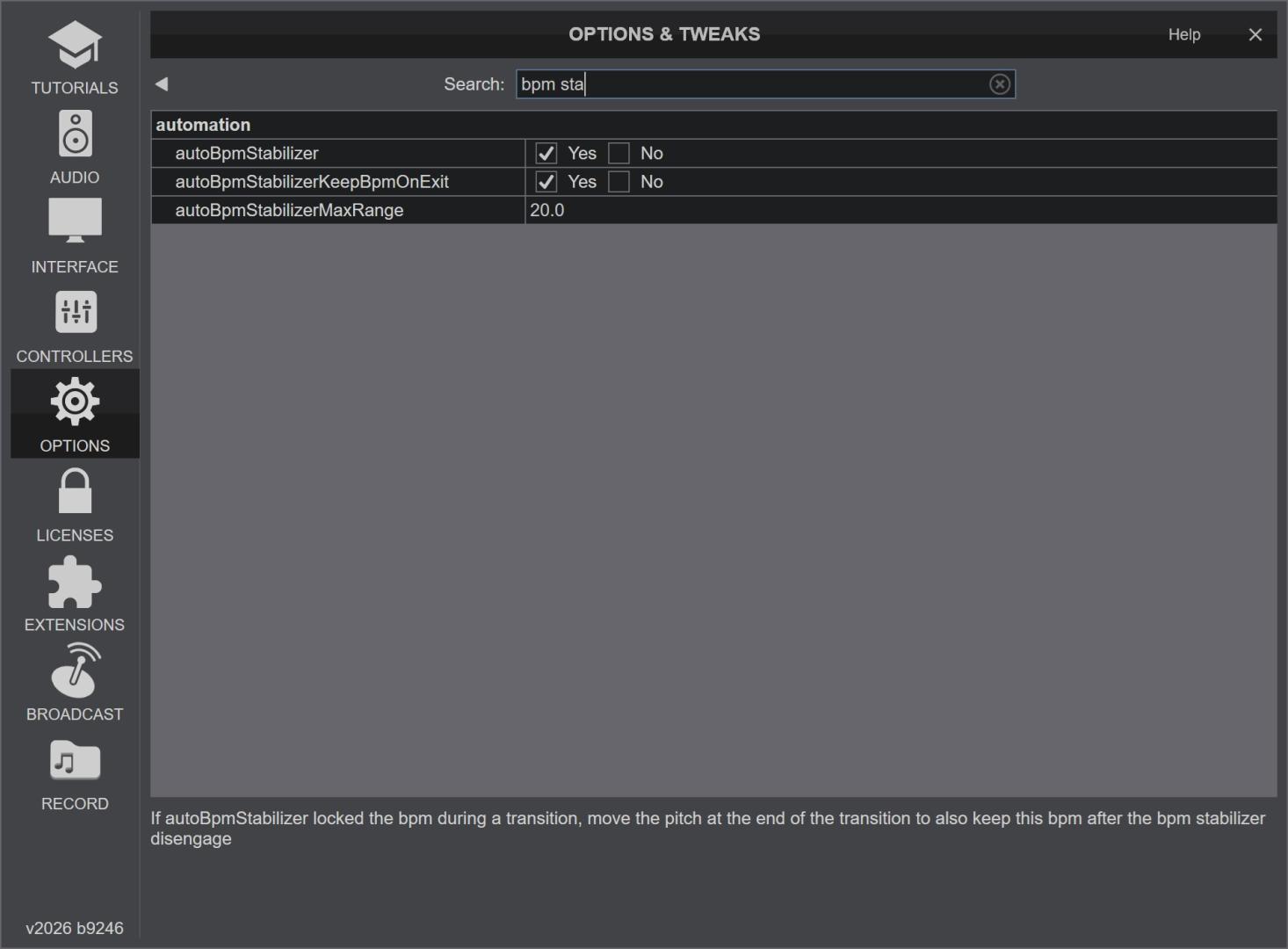
Was this with or without the bpm stabilizer active?
Posted Wed 08 Apr 26 @ 8:16 pm
MacGyverGear
Adion wrote :
Was this with or without the bpm stabilizer active?
Wasn't aware of any settings. During my tests it was seemed to be set to 'on'
Posted Wed 08 Apr 26 @ 9:36 pm