


 DJJamieFox
From Pete via Discord:
We have a preview fix/workaround for the inMusic (AKAI, RANE, m-audio, etc.) driver hang.
This preview includes everything in the previous Dyanmic Ports fix preview (loopMIDI, rtpMIDI, etc.) as well as the change in behavior to work around the inMusic driver bug.
This fix changes how we close **all** drivers, so needs broad testing with many different third-party MIDI drivers and devices, as well as with m-audio, AKAI, etc. drivers. We've tested with the ones we have, and so far, so good.
We've tested with the Akai and m-audio devices we have. We'd like folks with older m-audio drivers and devices to test this as well. If you are currently blocked by not being able to use a device from this brand, it's worth giving this a try.
## Instructions
- Turn on, and leave on, developer mode in `Settings > System > Advanced > For developers`. **For this preview plugin to remain working, you must leave developer mode enabled.** That's just because the preview is unsigned, and we check for developer mode before we allow loading of unsigned service plugins.
- If you have the previous KSA preview installed, please uninstall it from `Settings > Apps > Installed Apps`.
- Then install this KSA preview.
- I recommend rebooting afterwards to be sure.
## The Installer
Attached is the installer for x64. As none of these drivers were previously available for Arm64, I'm not planning to put out an Arm64 preview. As with other previews, this is unsigned and so may throw up warnings when you run the installer.
-----------------------------------------------------------------------
**IMPORTANT: During the fourth week of April, there will be another MIDI update. To retain these fixes, you will need to uninstall and then reinstall this preview fix after the KB comes through in the 4th week of April.** Why? Because the in-box update resets the registration to the non-preview components in System32.
-----------------------------------------------------------------------
## Bugs Fixes
- The previous fixes for loopMIDI, rtpMIDI, etc. are all still in place in this preview.
- InMusic drivers hanging the service (AKAI, m-audio, RANE, and many others).
- Issue 953 WinRT MIDI 1.0 messages from same driver packet have different timestamps (primarily for djay pro)
## Tested With
So far, we have tested this fix with these drivers:
- AKAI MPK mini with AKAI driver
- Roland UM-ONE in vendor mode with Roland Driver
- loopMIDI driver
- BomeMIDI driver
These devices work, but have bad note data coming through in addition to the normal note data, so we had to update the Bytestream translator (BS2UMP Transform) to ignore the extra invalid data. With that change to the transform in place, these all work.
- M-Audio Uno with MIDISPORT Windows Driver v6.1.3
- M-Audio MIDISPORT 2x2 (old yellow/green and blue one) with MIDISPORT Windows Driver v6.1.3
- M-Audio MIDISPORT 4x4 Anniversary Edition with same driver as the others
- M-Audio MIDISPORT 4x4 Old yellow/green and blue one) with same 6.1.3 driver
- M-Audio MIDISPORT 4x4 Old Silver one with same 6.1.3 driver
- M-Audio MIDISPORT 2x4 (black one with black and silver faceplate) with same 6.1.3 driver
Needs testing with other devices, especially combined audio/MIDI devices, and inMusic brand DJ equipment. If you test and find it to fix the issue for you with one of those devices, please feel free to reply below with the device name/model so that others will know.
## Known Issues
Surprise removal (powering off or unplugging the device while in use) can hang the service for 30 seconds or more with these devices. Don't have a workaround for that yet.
The preview is in the original link at Pete's Discord Group.
Post Link: https://discord.com/channels/980245825202552942/1488704319271206933/1488704319271206933
We have a preview fix/workaround for the inMusic (AKAI, RANE, m-audio, etc.) driver hang.
This preview includes everything in the previous Dyanmic Ports fix preview (loopMIDI, rtpMIDI, etc.) as well as the change in behavior to work around the inMusic driver bug.
This fix changes how we close **all** drivers, so needs broad testing with many different third-party MIDI drivers and devices, as well as with m-audio, AKAI, etc. drivers. We've tested with the ones we have, and so far, so good.
We've tested with the Akai and m-audio devices we have. We'd like folks with older m-audio drivers and devices to test this as well. If you are currently blocked by not being able to use a device from this brand, it's worth giving this a try.
## Instructions
- Turn on, and leave on, developer mode in `Settings > System > Advanced > For developers`. **For this preview plugin to remain working, you must leave developer mode enabled.** That's just because the preview is unsigned, and we check for developer mode before we allow loading of unsigned service plugins.
- If you have the previous KSA preview installed, please uninstall it from `Settings > Apps > Installed Apps`.
- Then install this KSA preview.
- I recommend rebooting afterwards to be sure.
## The Installer
Attached is the installer for x64. As none of these drivers were previously available for Arm64, I'm not planning to put out an Arm64 preview. As with other previews, this is unsigned and so may throw up warnings when you run the installer.
-----------------------------------------------------------------------
**IMPORTANT: During the fourth week of April, there will be another MIDI update. To retain these fixes, you will need to uninstall and then reinstall this preview fix after the KB comes through in the 4th week of April.** Why? Because the in-box update resets the registration to the non-preview components in System32.
-----------------------------------------------------------------------
## Bugs Fixes
- The previous fixes for loopMIDI, rtpMIDI, etc. are all still in place in this preview.
- InMusic drivers hanging the service (AKAI, m-audio, RANE, and many others).
- Issue 953 WinRT MIDI 1.0 messages from same driver packet have different timestamps (primarily for djay pro)
## Tested With
So far, we have tested this fix with these drivers:
- AKAI MPK mini with AKAI driver
- Roland UM-ONE in vendor mode with Roland Driver
- loopMIDI driver
- BomeMIDI driver
These devices work, but have bad note data coming through in addition to the normal note data, so we had to update the Bytestream translator (BS2UMP Transform) to ignore the extra invalid data. With that change to the transform in place, these all work.
- M-Audio Uno with MIDISPORT Windows Driver v6.1.3
- M-Audio MIDISPORT 2x2 (old yellow/green and blue one) with MIDISPORT Windows Driver v6.1.3
- M-Audio MIDISPORT 4x4 Anniversary Edition with same driver as the others
- M-Audio MIDISPORT 4x4 Old yellow/green and blue one) with same 6.1.3 driver
- M-Audio MIDISPORT 4x4 Old Silver one with same 6.1.3 driver
- M-Audio MIDISPORT 2x4 (black one with black and silver faceplate) with same 6.1.3 driver
Needs testing with other devices, especially combined audio/MIDI devices, and inMusic brand DJ equipment. If you test and find it to fix the issue for you with one of those devices, please feel free to reply below with the device name/model so that others will know.
## Known Issues
Surprise removal (powering off or unplugging the device while in use) can hang the service for 30 seconds or more with these devices. Don't have a workaround for that yet.
The preview is in the original link at Pete's Discord Group.
Post Link: https://discord.com/channels/980245825202552942/1488704319271206933/1488704319271206933
Posted Wed 01 Apr 26 @ 9:53 am
 kradcliffe
Most people just want to turn on their PC and it work properly.
It also doesn't help that Denon In Music have literally just repackaged the same ASIO drivers since like 2010
It also doesn't help that Denon In Music have literally just repackaged the same ASIO drivers since like 2010
Posted Wed 01 Apr 26 @ 9:55 am
DJJamieFox
kradcliffe wrote :
Most people just want to turn on their PC and it work properly.
No kidding. Oddly enough, it seems this problem is getting fixed without InMusic having to update their drivers.
Posted Wed 01 Apr 26 @ 9:59 am
 groovindj
Not been tested with inMusic DJ equipment. Why not? I thought inMusic were getting involved?
After the first fiasco, KB updates causing chaos because they hadn't been tested with DJ equipment, we now get a fix - that hasn't been tested on DJ equipment. 🤣
After the first fiasco, KB updates causing chaos because they hadn't been tested with DJ equipment, we now get a fix - that hasn't been tested on DJ equipment. 🤣
Posted Wed 01 Apr 26 @ 10:00 am
DJJamieFox
I totally agree with you. For now, most people will want to employ VDJ's MIDI 2.0 or the ViveTool fix until this issue is resolved (either by MS, InMusic or both). Yes, this is Beta testing at it finest. I will be testing this against my Rane Four to see if it can address the problem.
Like you, I want to not have to disable parts of the OS to make things work.
Like you, I want to not have to disable parts of the OS to make things work.
Posted Wed 01 Apr 26 @ 10:07 am
 Pete Brown
groovindj wrote :
Not been tested with inMusic DJ equipment. Why not? I thought inMusic were getting involved?
After the first fiasco, KB updates causing chaos because they hadn't been tested with DJ equipment, we now get a fix - that hasn't been tested on DJ equipment. 🤣
After the first fiasco, KB updates causing chaos because they hadn't been tested with DJ equipment, we now get a fix - that hasn't been tested on DJ equipment. 🤣
inMusic is working on their driver bug. They'll test their driver with their equipment.
In parallel, and independent of the inMusic driver work, we have put together a workaround in Windows that unblocks customers and make it available as quickly as possible. We also wanted to try to unblock the very old devices that likely wouldn't get updated drivers.
We have some pioneer DJ equipment that we test on, and some small Hercules devices, but I don't have any DJ equipment from inMusic (Numark, Denon, etc). So I asked for help for those who are interested. Some people want to be helpful and also get unblocked right now. Others apparently, not so much.
We tested a ton of stuff, but we can't possibly test every third-party driver and device going back to 1993 when the API we've replaced first came out, and I can't go on reverb and buy every device. We ask application and hardware developers to join during the very long preview period and verify their apps and devices. When that doesn't happen, you end up with things like a missed bug in a driver. Same happens on macOS where instead of partners testing during test periods, they just issue statements saying "Don't update to macOS xyz until after we've verified". We have no control over that process.
Pete
Microsoft
Posted Wed 01 Apr 26 @ 5:59 pm
DJJamieFox
The preview works with my Rane Four, Driver ver. 1.0.8 and firmware 1.8.0.18. No obvious hangs either launching or closing Virtual DJ. I have not tested Serato Pro but expect no real issues there.
Posted Wed 01 Apr 26 @ 6:17 pm
 gjmakaveli
DJJamieFox wrote :
FYI: As of this morning Virtual DJ released early access (b9245) that has a check box to disable/enable MIDI 2.0! You'll find this in Controllers -> Missing Controller?, Look for the MIDI 2.0 check box on the lower right. Way to go Virtual DJ!
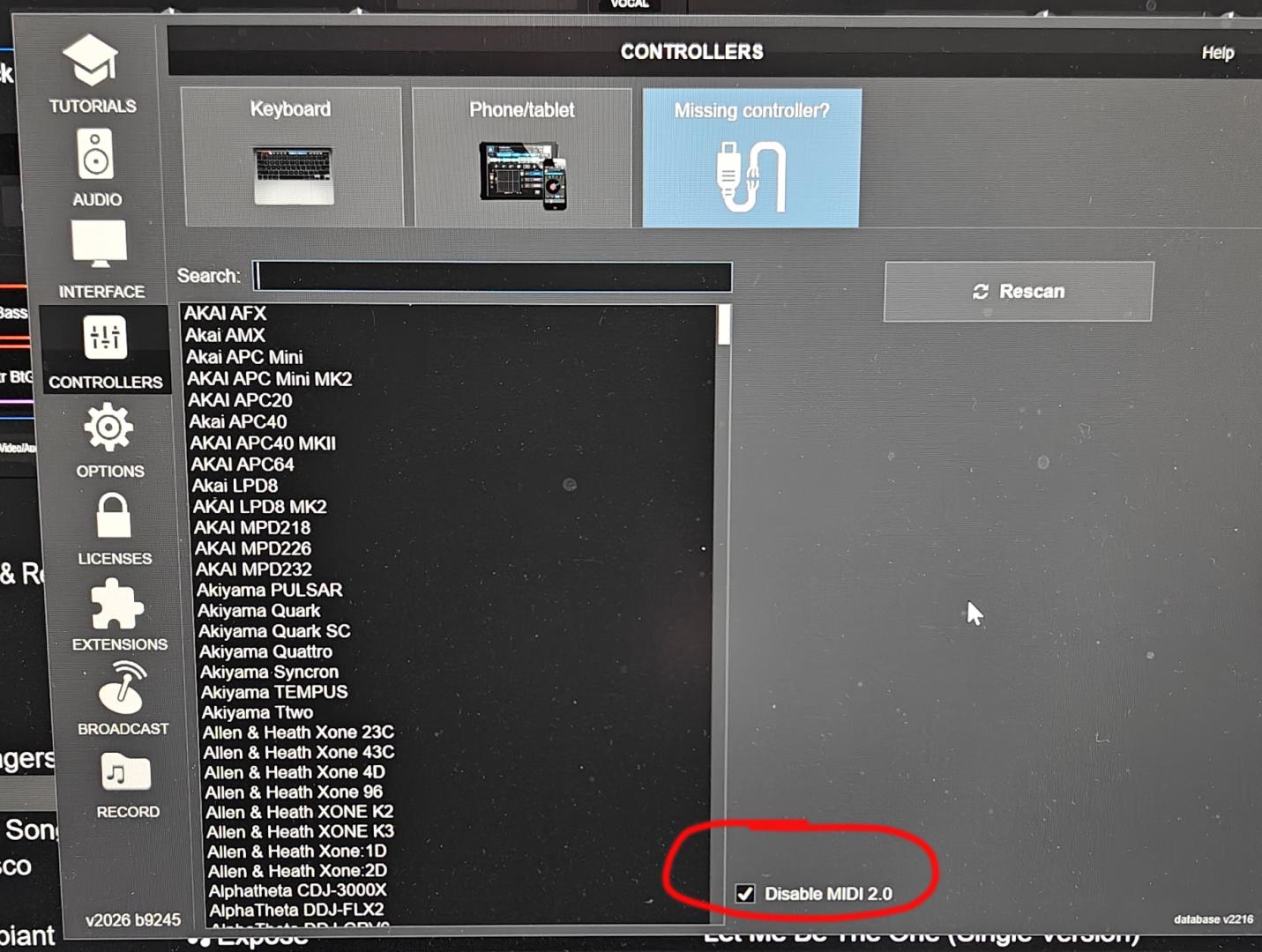
Anybody reported the above solution not working?
Apologies if I've missed it - I have a very important gig tomorrow, and I'm panicking since I've been noticing some glitches with my controller (Denon MC4000) over the last day or two.
Posted Thu 16 Apr 26 @ 5:57 pm
DJJamieFox
@Gjmakaveli
This should continue to function until the last week of the month. There is an InMusic fix that Microsoft came up with for the MIDI 2.0 that works with the Denon MC7000 (is that similar to the MC4000?) without disabling anything... That fix will become part of Windows 11 by the end of April into early May.
You'll find that here: https://discord.com/channels/980245825202552942/1488704319271206933 at the top of the thread.
This should continue to function until the last week of the month. There is an InMusic fix that Microsoft came up with for the MIDI 2.0 that works with the Denon MC7000 (is that similar to the MC4000?) without disabling anything... That fix will become part of Windows 11 by the end of April into early May.
You'll find that here: https://discord.com/channels/980245825202552942/1488704319271206933 at the top of the thread.
Posted Fri 17 Apr 26 @ 4:58 pm
DJJamieFox
If you are a Windows Insider and can get Release Previews, the one you're looking for is RP (26200.8313 or 26100.8313). This makes a permanent fix for InMusic drivers beyond the KSA Preview. This is no longer in development it is part of Windows now.
If you have the KSA preview installed, you will need to uninstall it and run these 4 commands (CMD admin mode):
Then let the RP update install.
After this, there is no need to run ViVeTool or disable MIDI 2.0 in any way. Windows will just work as it should with InMusic drivers. In fact, you must re-enable MIDI 2.0 before doing any of this.
If you have the KSA preview installed, you will need to uninstall it and run these 4 commands (CMD admin mode):
regsvr32 %windir%\System32\Midi2.KSAggregateTransport.dll
regsvr32 %windir%\System32\Midi2.BS2UMPTransform.dll
net stop midisrv
net start midisrv
Then let the RP update install.
After this, there is no need to run ViVeTool or disable MIDI 2.0 in any way. Windows will just work as it should with InMusic drivers. In fact, you must re-enable MIDI 2.0 before doing any of this.
Posted Tue 21 Apr 26 @ 1:52 am
+33BLANK
Hi I read the whole thread, very interesting and reassuring that I'm not the only one concerned...
However, it's have been said that pioneer devices are not affected by this update. I can prove you wrong. I'm using a DDJ-FLX4 on Rekordbox for now 2 years. In March, after the Microsoft update, I wasn't able to use it anymore. I can tell you that when it happended, I was mentaly broke and stuck on the problem for a whole week, losing hours trying to fix it with our any result...
I tryed a loooooottt of things. I tried on Serato, on my friends updated PC, with the exact same model of DDJ-FLX4 of another friend. But nothing worked out. I also tried my dj gear on the mac of a DJ friend and it was working proprely !
I have to say, I'm really starting thinking about trying the VoVel technic... I have to work on future GIGS and I can't stay like that for one month again... Do you advise me to do it ?
Also, sorry for being a Rekordbox user here... This is the only thread I could read about on internet.
However, it's have been said that pioneer devices are not affected by this update. I can prove you wrong. I'm using a DDJ-FLX4 on Rekordbox for now 2 years. In March, after the Microsoft update, I wasn't able to use it anymore. I can tell you that when it happended, I was mentaly broke and stuck on the problem for a whole week, losing hours trying to fix it with our any result...
I tryed a loooooottt of things. I tried on Serato, on my friends updated PC, with the exact same model of DDJ-FLX4 of another friend. But nothing worked out. I also tried my dj gear on the mac of a DJ friend and it was working proprely !
I have to say, I'm really starting thinking about trying the VoVel technic... I have to work on future GIGS and I can't stay like that for one month again... Do you advise me to do it ?
Also, sorry for being a Rekordbox user here... This is the only thread I could read about on internet.
Posted 7 days ago @ 4:00 pm
 wickedmix
+33BLANK wrote :
Hi I read the whole thread, very interesting and reassuring that I'm not the only one concerned...
if you download virtual dj there is a option to disable midi 2.0 on your PC (it's free)
you could try that and see if it fixes it. it will work for any program you use because it changes windows
anyhow good luck
Posted 7 days ago @ 4:45 pm
DJJamieFox
Quote :
if you download virtual dj there is a option to disable midi 2.0 on your PC (it's free)
you could try that and see if it fixes it. it will work for any program you use because it changes windows
anyhow good luck
if you download virtual dj there is a option to disable midi 2.0 on your PC (it's free)
you could try that and see if it fixes it. it will work for any program you use because it changes windows
anyhow good luck
Yes, this should work for Rekordbox as well. The only thing that is unknown is if VDJ's MIDI 2.0 checkbox will continue to function AFTER May's Windows updates (KB5083631) aka 26200.8313. I never got an answer if VDJ's MIDI 2.0 checkbox is based on ViVeTool's functions. If it is, it won't work after the next rounds of updates because the disabled CFR will have changed in ID. In May, Microsoft's official MIDI 2.0 will come to most machines and workarounds won't be required anymore.
If you are a 'Windows Insider' on the Release Preview ring, you can get the 'fixed' version of MIDI 2.0 now and using the disable MIDI 2.0 function is no longer necessary.
Posted 6 days ago @ 12:37 pm
DJJamieFox
+33BLANK wrote :
Hi I read the whole thread, very interesting and reassuring that I'm not the only one concerned...
However, it's have been said that pioneer devices are not affected by this update. I can prove you wrong. I'm using a DDJ-FLX4 on Rekordbox for now 2 years. In March, after the Microsoft update, I wasn't able to use it anymore. I can tell you that when it happended, I was mentaly broke and stuck on the problem for a whole week, losing hours trying to fix it with our any result...
I tryed a loooooottt of things. I tried on Serato, on my friends updated PC, with the exact same model of DDJ-FLX4 of another friend. But nothing worked out. I also tried my dj gear on the mac of a DJ friend and it was working proprely !
I have to say, I'm really starting thinking about trying the VoVel technic... I have to work on future GIGS and I can't stay like that for one month again... Do you advise me to do it ?
Also, sorry for being a Rekordbox user here... This is the only thread I could read about on internet.
However, it's have been said that pioneer devices are not affected by this update. I can prove you wrong. I'm using a DDJ-FLX4 on Rekordbox for now 2 years. In March, after the Microsoft update, I wasn't able to use it anymore. I can tell you that when it happended, I was mentaly broke and stuck on the problem for a whole week, losing hours trying to fix it with our any result...
I tryed a loooooottt of things. I tried on Serato, on my friends updated PC, with the exact same model of DDJ-FLX4 of another friend. But nothing worked out. I also tried my dj gear on the mac of a DJ friend and it was working proprely !
I have to say, I'm really starting thinking about trying the VoVel technic... I have to work on future GIGS and I can't stay like that for one month again... Do you advise me to do it ?
Also, sorry for being a Rekordbox user here... This is the only thread I could read about on internet.
There is a Microsoft Discord group that is dealing with the MIDI 2.0 issues. Pete Brown is pretty good at responding to said issues. Open a thread there outlining the problems with the DDJ-FLX4 and they'll help you through it. The link to start a new thread is here: https://discord.com/channels/980245825202552942/1350564396631462069
FYI: I skimmed through the Discord server and found the FLX4 issues... They seem to be the same as the issues we've had with InMusic. So the KSA preview, MIDI 2.0 disable in VDJ or the Insider Preview should all fix that.
Posted 6 days ago @ 12:43 pm
groovindj
I'd suggest it makes most sense to use the VDJ option (disable MIDI 2.0) rather than install any preview builds of anything, if you're a working DJ. Confine those to testing at home.
Posted 6 days ago @ 1:07 pm
DJJamieFox
groovindj wrote :
I'd suggest it makes most sense to use the VDJ option (disable MIDI 2.0) rather than install any preview builds of anything, if you're a working DJ. Confine those to testing at home.
In a couple of weeks that fix will cease to function and you won't be able to disable MIDI 2.0 anymore by its ID. VDJ's fix is probably based on ViVeTool which accesses a CFR by its ID. That ID has changed now the Official MIDI 2.0 is out on Insider builds and in about a week it will be a mandatory update. The testing is over, the fix is live whether people like it or not. The only way to get around it after Windows updates to 26200.8313 is to break your copy of Windows which would open you to security threats. I'd rather use a prescribed fix than disabling components or entire CFRs of the OS. That is not sound advice.
FYI: I am a working DJ that's done 35-40 paid gigs a year for the past 4 decades. I've been a Microsoft MCSE since 1990.
Posted 6 days ago @ 6:06 pm