


 Ray
Ray 
Hello again,
since VDJ somehow messed up my prepared stems I'm planning to completely reorganize my music library for quick and specific spontaneous access during preparation and live gigs. I love to do mash-ups and mainly select songs on the fly during a live gig, so a well-curated music library is essential for my play style.
Currently, I have a folder for each specific genre and also for each decade of pop music. While using VDJ I mainly browse through playlist, but they basically copy the folder structure (some songs are available on different locations, like Bangers and Salsa and Latin and Hooks for example).
This structure grew organically, but doesn't seem to be really straightforward. I guess I could cover the differentiation on genres via the tags for example? It also seems practical to have access to my whole library in one place to find a matching song by BPM or key quickly, regardless of genre and style.
Sometimes I just want to find a song, which has nice beat matching the currently playing one. If that's a Reggaeton song for example, I would just put it in several playlists: "All Songs" / "Reggaeton" / "Latin" / "Beats" - or is there a better way?
I'm open to exchange ideas and eager to hear how you're organizing your music library :)
since VDJ somehow messed up my prepared stems I'm planning to completely reorganize my music library for quick and specific spontaneous access during preparation and live gigs. I love to do mash-ups and mainly select songs on the fly during a live gig, so a well-curated music library is essential for my play style.
Currently, I have a folder for each specific genre and also for each decade of pop music. While using VDJ I mainly browse through playlist, but they basically copy the folder structure (some songs are available on different locations, like Bangers and Salsa and Latin and Hooks for example).
This structure grew organically, but doesn't seem to be really straightforward. I guess I could cover the differentiation on genres via the tags for example? It also seems practical to have access to my whole library in one place to find a matching song by BPM or key quickly, regardless of genre and style.
Sometimes I just want to find a song, which has nice beat matching the currently playing one. If that's a Reggaeton song for example, I would just put it in several playlists: "All Songs" / "Reggaeton" / "Latin" / "Beats" - or is there a better way?
I'm open to exchange ideas and eager to hear how you're organizing your music library :)
Posted Thu 12 Mar 26 @ 4:34 pm
 DJ VinylTouch
There is no right answer to this - it all depends on how you play and think about getting songs for a set, and that is different for every DJ.
To find out what works for you, you need to start with this question - when you approach doing a DJ set, how do you think about selecting songs?
Given you say you play spontaneously, I'm guessing you want a structure that allows you to find good matching songs to what is already playing without getting too overwhelming.
You can even have combinations of organizations within the structure.
What matters the most is how you go about thinking about selecting a song when you are playing live (and in addition, consider order of importance, as that will dictate the hierachy of organization if you choose to introduce such). That is what would dictate your organization structure and the best tools for the job.
I personally 1) Like thinking in terms of Genre and timeline (decades and year) 2) Open format org too (no genre just a mixiture of music) 2) Automatic generation of lists where possible => lots of custom hashtags 3) set lists where needed (e.g. gigs)
4) OS folders + favorite folders pointing those folders for songs I know only appluly to a specific gig (that I know I would most likely delete after on the music drive). I also use container folders to keep that manageable (open the parent only when I know I need to go there).
As you can see, that is a combination of everything said before.
To find out what works for you, you need to start with this question - when you approach doing a DJ set, how do you think about selecting songs?
Given you say you play spontaneously, I'm guessing you want a structure that allows you to find good matching songs to what is already playing without getting too overwhelming.
- Do you use the search a lot?
Then you want to make sure you song metadata tags are really clean/tidy. You probably even want to introduce search tags in a field that you don't use to help narrow things down (see hash tags and quick filters in the manual). You probably might also want search in all local folders enabled to make sure everything in the search database is considered - Do you think about song by Genre or some other clearly defined metadata tag?
Then you want that somewhere in your structure - Do you think of song by some timeline (e.g. date)
Then you want something date based in your structure (e.g. organized bu decade) - Do you think of songs by special topics (e.g. Holidays like Christmas, or lounge songs, or hype songs)?
Then you want topic folders - hashtags could help with custom generation here too. - Do you want automatic updating of lists?
Then you want to create filter folders that narrow based on tags, and once again, make sure you song metadata is good - Do you like pre-preparing lists for gigs?
Then you want some kind of a setlist structure for dates. - Do you organize at the file folder structure level?
Then maybe you just want a favorites folder pointing to the root location of that organization.
You can even have combinations of organizations within the structure.
What matters the most is how you go about thinking about selecting a song when you are playing live (and in addition, consider order of importance, as that will dictate the hierachy of organization if you choose to introduce such). That is what would dictate your organization structure and the best tools for the job.
I personally 1) Like thinking in terms of Genre and timeline (decades and year) 2) Open format org too (no genre just a mixiture of music) 2) Automatic generation of lists where possible => lots of custom hashtags 3) set lists where needed (e.g. gigs)
4) OS folders + favorite folders pointing those folders for songs I know only appluly to a specific gig (that I know I would most likely delete after on the music drive). I also use container folders to keep that manageable (open the parent only when I know I need to go there).
As you can see, that is a combination of everything said before.
Posted Thu 12 Mar 26 @ 5:03 pm
jangeador
One tip that I wish I knew before reorganizing is that doing all the move operations within VirtualDJ keeps your play information, play count, etc along with the songs you move. I used to organize files from the OS and it lost my history for tracks which is, in my opinion, the best data to have. Now I move all my songs from within virtualdj.
Posted Thu 12 Mar 26 @ 8:57 pm
 the SOUND INSURGENT
Fill out as much of your tag info as humanly possible first then when you decide on a system itll make things much easier in my opinion.
Posted Sat 14 Mar 26 @ 12:42 pm
 DJJamieFox
I organize in Windows Explorer using folders for each genre, set index options to index them. I use mp3tag to set my tags up.
Posted Sun 15 Mar 26 @ 12:19 pm
 Dj Chachi
I'll share my organization.
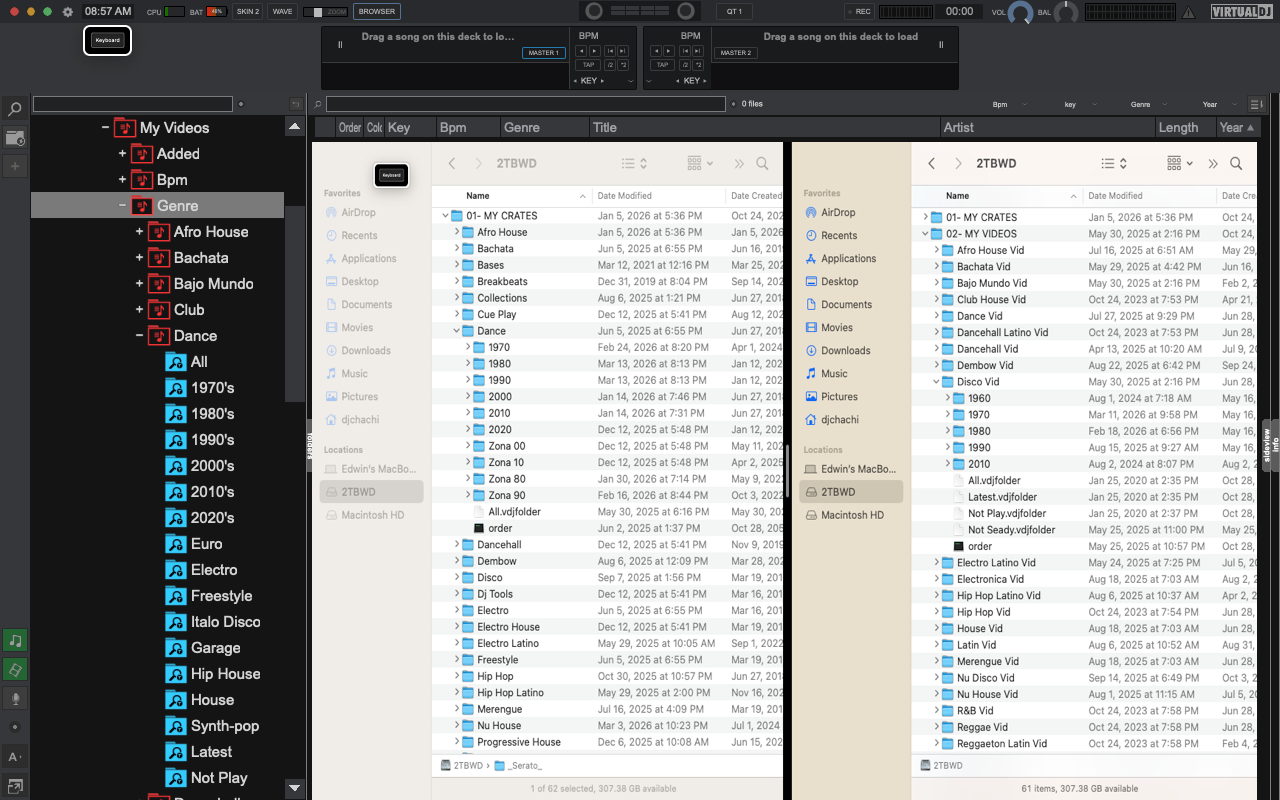
Posted Sun 15 Mar 26 @ 12:49 pm
Ray
Hello everyone! Thank you so much for sharing your tips, ideas and sorting systems. I decided to batch edit the tags of my complete library, also using custom tags (they stack) - I then created a lot of filters for genres, openers, songs matching BPM or key of the current song. It's perfect! Again I know why to stick with Virtual DJ is worth it. I just wonder if that system transfers if I want to export my library to use on CDJs? I dream and dread about having to play with "professional" equipment if things become more serious one day...
Posted Tue 24 Mar 26 @ 9:52 pm
DJ VinylTouch
Rekordbox USB sticks are based on pre-created playlists - you just create the ones you need for a gig and add the songs required.
Your general library structure can help with narrowing your search for songs, but is largely independent.
Your general library structure can help with narrowing your search for songs, but is largely independent.
Posted Tue 24 Mar 26 @ 10:01 pm
 DJNeidermeyer
One thing I've done is set up custom colors filters for certain file types, like yellow for FLAC, green for mp4 videos, cyan for mp4 videos with FLAC audio, etc.
Posted Wed 25 Mar 26 @ 6:37 pm