


 Baldy68
I did a quick search for figuring out the best procedure to move the whole music collection, but I couldn't find anything useful. I would appreciate if I can be pointed to the right place for information about the best procedure, BEFORE I start reinstalling everything.
I absolutely must have all my Hot Que's and all data of the music files intakt since it is many years of work.
Since I am about to upgrade my C:\ to a bigger one. I am about to skip using Onedrive on my D:\ disk and instead move everything to my C:\ (and also going back to use local backups), after reinstalling windows on the new M.2 drive.
This of course means all my music files in database.xml will have the wrong path...even though the file structure will be the same.
I absolutely must have all my Hot Que's and all data of the music files intakt since it is many years of work.
Since I am about to upgrade my C:\ to a bigger one. I am about to skip using Onedrive on my D:\ disk and instead move everything to my C:\ (and also going back to use local backups), after reinstalling windows on the new M.2 drive.
This of course means all my music files in database.xml will have the wrong path...even though the file structure will be the same.
Posted Tue 25 Feb 25 @ 4:32 pm
 DJ-U2HU
I would recommend editing the XML database file with free FindAndReplace tool
in order to replace the outdated paths. Either the command line based FNR tool
or the GUI based method (which can create a batch file).
Since you keep the folder structure it should be only one find&replace process.
So it could also be made with Notepad++ texteditor for example.
For future relocations I recommend to use ONE constant drive letter
for all media files. E.g. drive m:\ for music, p:\ for photos, v:\ for videos ...
It is fast and simple to allocate every file location with commands
like "subst" or "net use" to any letter. Even subdirectories can be addressed.
With this it does not matter where the files are physically located and you can
switch fast from internal to external hard disks or vice versa or to a backup disk.
in order to replace the outdated paths. Either the command line based FNR tool
or the GUI based method (which can create a batch file).
Since you keep the folder structure it should be only one find&replace process.
So it could also be made with Notepad++ texteditor for example.
For future relocations I recommend to use ONE constant drive letter
for all media files. E.g. drive m:\ for music, p:\ for photos, v:\ for videos ...
It is fast and simple to allocate every file location with commands
like "subst" or "net use" to any letter. Even subdirectories can be addressed.
With this it does not matter where the files are physically located and you can
switch fast from internal to external hard disks or vice versa or to a backup disk.
Posted Tue 25 Feb 25 @ 6:19 pm
Baldy68
Thank you for your suggestions. Is there no easier way built into VDJ??
Posted Tue 25 Feb 25 @ 6:43 pm
 kradcliffe
Copy the music from inside VDJ to an external drive then copy it back in from that drive to your new PC. It will create a database on the external drive then use that info to copy back to the new one.
Posted Tue 25 Feb 25 @ 6:46 pm
DJ-U2HU
The proposal from Kradcliffe is certainly not so complicated.
But you can combine his an my proposal:
1. Old PC:
Define for the external drive the same drive letter (e.g. m:\)
as wanted for the target drive on the new PC.
Copy from inside VDJ to this drive.
2. New PC:
Connect the external drive with a different drive letter (e.g. not m:\).
Copy from outside VDJ from external drive to target drive.
Allocate the required drive letter to target drive (e.g. m:\) with tools
like Win Diskmanager or better with subst command.
Example: subst m: c:/path/music/
Start VDJ on new PC.
You can test this method with a small number of music files
in some subdirectories with little risk.
Without tools like USBDLM, Windows is always using drive letters d, e, f, g ...
when a new disk or usb stick is connected. So it is a good idea not to use
the first letters in alphabet for important (substituted) drive letters.
Otherwise a letter can be blocked when you connect your relevant
stick or drive later after connecting any other disk/stick.
But you can combine his an my proposal:
1. Old PC:
Define for the external drive the same drive letter (e.g. m:\)
as wanted for the target drive on the new PC.
Copy from inside VDJ to this drive.
2. New PC:
Connect the external drive with a different drive letter (e.g. not m:\).
Copy from outside VDJ from external drive to target drive.
Allocate the required drive letter to target drive (e.g. m:\) with tools
like Win Diskmanager or better with subst command.
Example: subst m: c:/path/music/
Start VDJ on new PC.
You can test this method with a small number of music files
in some subdirectories with little risk.
Without tools like USBDLM, Windows is always using drive letters d, e, f, g ...
when a new disk or usb stick is connected. So it is a good idea not to use
the first letters in alphabet for important (substituted) drive letters.
Otherwise a letter can be blocked when you connect your relevant
stick or drive later after connecting any other disk/stick.
Posted Tue 25 Feb 25 @ 7:51 pm
 fx850
fx850
If you use the internal copy and move functions, Vdj knows where the files are and update the database as you transfer the files
Move everything with Vdj to d: then install the new windows on a new C: and the new Vdj use the virtualdj folder on d:
You can copy (with the windows explorer) the whole virtualdj folder from C to the new directory under c: and all settings are the same.
Move everything with Vdj to d: then install the new windows on a new C: and the new Vdj use the virtualdj folder on d:
You can copy (with the windows explorer) the whole virtualdj folder from C to the new directory under c: and all settings are the same.
Posted Tue 25 Feb 25 @ 8:43 pm
Baldy68
Ok, I got the hot cues and ratings. But even though I copied my whole VirtualDJ folder from "my documents" on the old disk to the new, I can't see either "My lists" or "filter folders" and no history...Is there somewhere else VDJ save config files I need to copy over? I have all the data left on the old disk.
Posted Wed 26 Feb 25 @ 11:47 pm
 locoDog
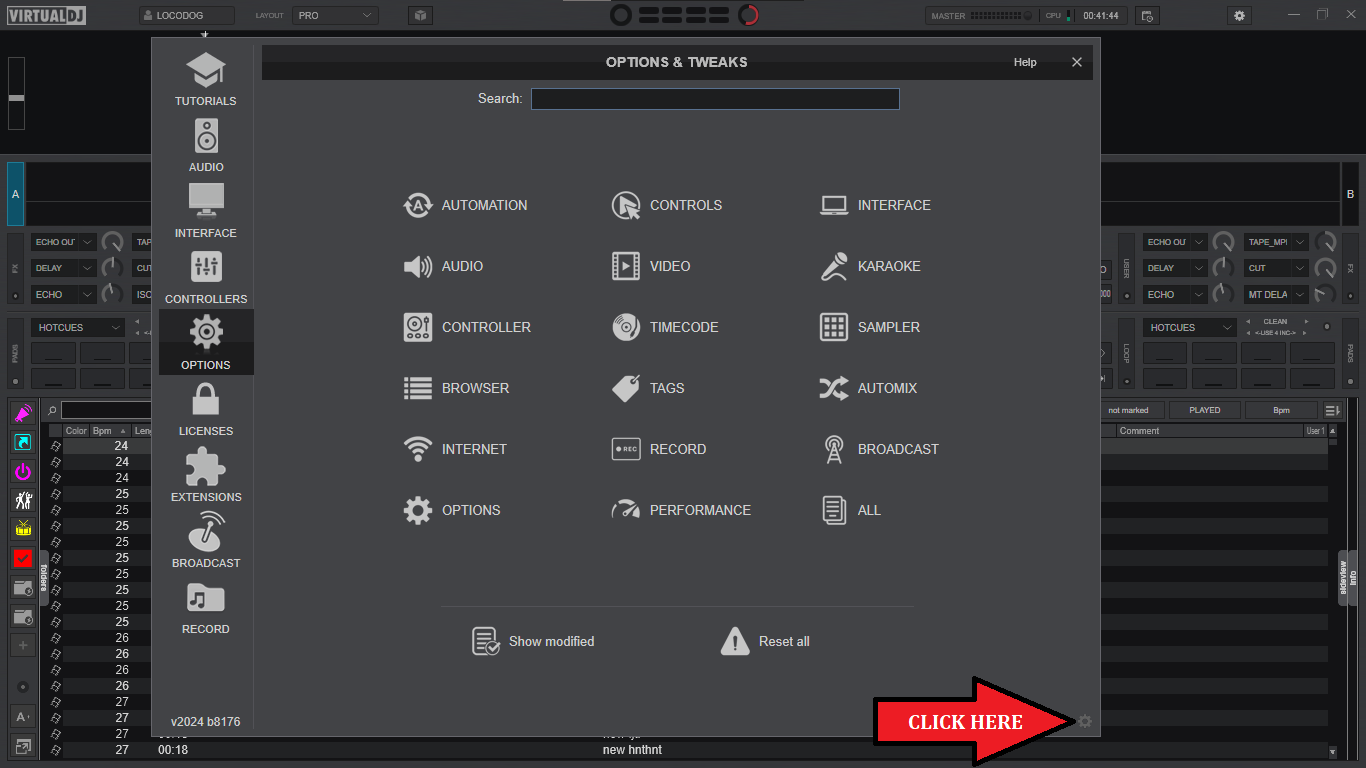
new installs don't create a home folder in myDocs any more, click the gear to see it installs now.
Posted Wed 26 Feb 25 @ 11:56 pm
Baldy68
Oh, I had no clue they moved the directory! Now everything is back as before, thank you Locodog and all others that helped me :-D
Posted Thu 27 Feb 25 @ 9:39 am