


 artdecho
I am trying to implement this solution to send midi note information from VirtualDJ to Cubase (or any popular DAW such as Ableton) via LoopBe1 (a free virtual midi driver).
My goal : Once I am able to send MIDI notes/controls to my DAW, I will be able to control my live performance in the DAW from VDJ by remapping them in the DAW (for example to mute/unmute a track in the DAW, start recording to record a live played drum beat-loop, etc.).
After many days of setup and test, so far I am not receiving the note sent by VDJ in Cubase.
I started from theVDJ thread :
https://www.virtualdj.com/forums/215094/VirtualDJ_Technical_Support/How_can_I_send_Midi_signals_with_Points_of_Interest_in_Virtual_DJ_.html
So far I did the following configuration:
1- Created a custom button that I can trigger manually with code:
repeat_start_instant 'StartFunkyChase' 2000ms 2 & toggle "$Chase1"
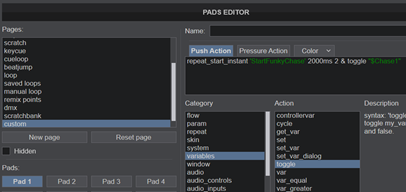
2- Added a mapping to the existing LoopBe mapping (which was empty by default) :
<map value="LED_CHASE1" action="get_var '$Chase1'" />
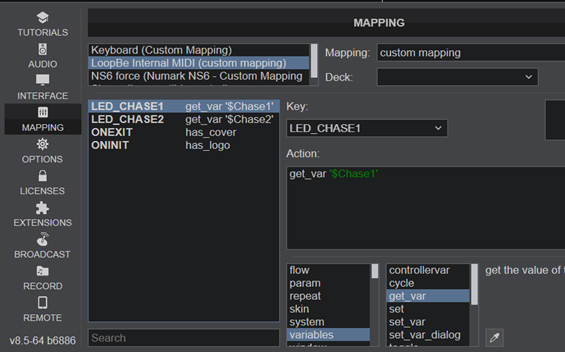
By looking at the existing file in the mapping directory, I found the file SIMPLE_MIDI_0_0 – custom mapping.xml that tells me that the name of the device is SIMPLE_MIDI_0_0
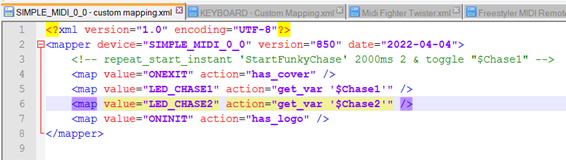
3- Created a VirtualDJ device for LoopBe (there was none) with the filename force-SIMPLE_MIDI_0_0.xml in the VirtualDJ device directory (the force tells VDJ to load the device to override the default device) with the suggested code:
<led note="0x17" name="LED_CHASE1" channel="1" />
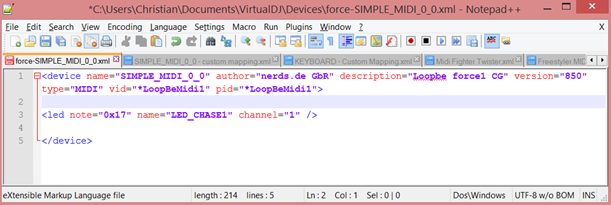
I took/guessed the vid/pid from the system properties (I know this is where they are for physical controller):
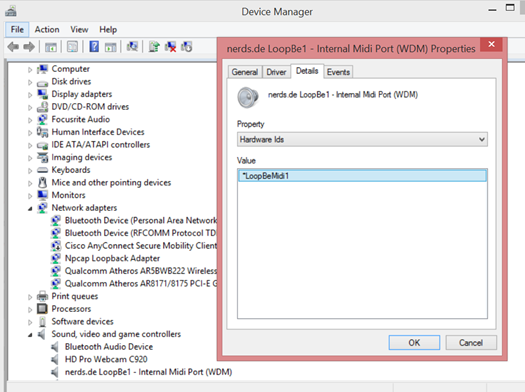
The device does not show as loaded in the list of controllers per se but it is in the list ‘Show all compatible controllers…’ and it is in bold (unlike others), plus when I click on it, it shows the mapping of the LoopBe (this tells me that virtualDJ made the association with LoopBe)
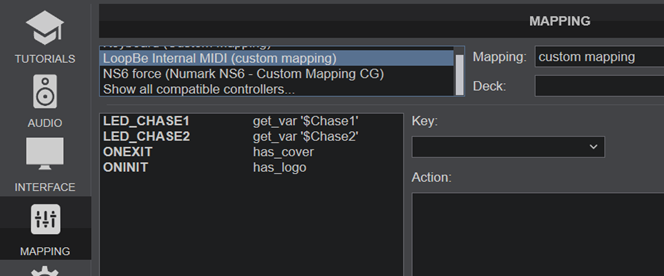
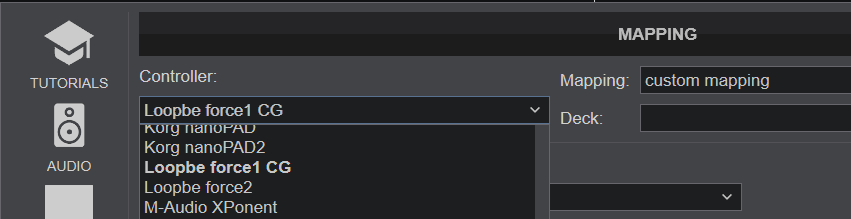
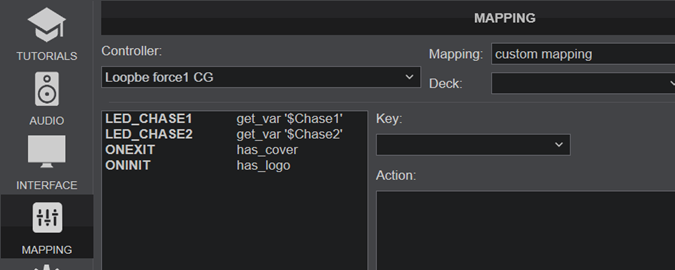
4- Cubase is setup and ready to receive: it’s a note so I will see it come in easily. So far, no luck.
Any suggestions of what I could change in the config or what I could try? Any other way to achieve my goal?
My goal : Once I am able to send MIDI notes/controls to my DAW, I will be able to control my live performance in the DAW from VDJ by remapping them in the DAW (for example to mute/unmute a track in the DAW, start recording to record a live played drum beat-loop, etc.).
After many days of setup and test, so far I am not receiving the note sent by VDJ in Cubase.
I started from theVDJ thread :
https://www.virtualdj.com/forums/215094/VirtualDJ_Technical_Support/How_can_I_send_Midi_signals_with_Points_of_Interest_in_Virtual_DJ_.html
So far I did the following configuration:
1- Created a custom button that I can trigger manually with code:
repeat_start_instant 'StartFunkyChase' 2000ms 2 & toggle "$Chase1"
2- Added a mapping to the existing LoopBe mapping (which was empty by default) :
<map value="LED_CHASE1" action="get_var '$Chase1'" />
By looking at the existing file in the mapping directory, I found the file SIMPLE_MIDI_0_0 – custom mapping.xml that tells me that the name of the device is SIMPLE_MIDI_0_0
3- Created a VirtualDJ device for LoopBe (there was none) with the filename force-SIMPLE_MIDI_0_0.xml in the VirtualDJ device directory (the force tells VDJ to load the device to override the default device) with the suggested code:
<led note="0x17" name="LED_CHASE1" channel="1" />
I took/guessed the vid/pid from the system properties (I know this is where they are for physical controller):
The device does not show as loaded in the list of controllers per se but it is in the list ‘Show all compatible controllers…’ and it is in bold (unlike others), plus when I click on it, it shows the mapping of the LoopBe (this tells me that virtualDJ made the association with LoopBe)
4- Cubase is setup and ready to receive: it’s a note so I will see it come in easily. So far, no luck.
Any suggestions of what I could change in the config or what I could try? Any other way to achieve my goal?
Posted Tue 12 Apr 22 @ 6:12 pm
 locoDog
you're going wrong at 3, simple midi is just a cover all for simple midi [no output to device], I believe devices with output [even virtual ones ] need to be defined, this is a defintion for midi in to LOOPMIDI [think it was in to soundswitch or unreal4]
The definition name is important, device name is important
LOOPMIDI.xml
The definition name is important, device name is important
LOOPMIDI.xml
<?xml version="1.0" encoding="UTF-8"?>
<device name="LOOPMIDI" author="locodog" version="805" description="LOOPMIDI" type="MIDI" decks="2" drivername="loopMIDI port" >
<bar cc="0x00" name="CROSSFADER_REPORT" channel="0" />
<bar cc="0x01" name="VARIABLE_REPORT" channel="0" />
</device>
Posted Tue 12 Apr 22 @ 6:28 pm
artdecho
It works!! Thanks to your advice LOCODOG. Thanks so much.
So let me summarize this for everyone that wants to do this in the future:
I am trying to implement this solution to send midi note information from VirtualDJ to Cubase (or any popular DAW such as Ableton) via LoopBe1 (a free virtual midi driver).
My goal : Once I am able to send MIDI notes/controls to my DAW, I will be able to control my live performance in the DAW from VDJ by remapping them in the DAW (for example to mute/unmute a track in the DAW, start recording to record a live played drum beat-loop, etc.).
How-to:
Step 0- Download and install loopMIDI from Tobias Erichsen which is available here : https://www.tobias-erichsen.de/software/loopmidi.html
loopMIDI is a software can be used to create virtual loopback MIDI-ports to interconnect applications on Windows that want to open hardware-MIDI-ports for communication.
Start loopMIDI, create a port in loopMIDI by pressing the ‘+’ icon.
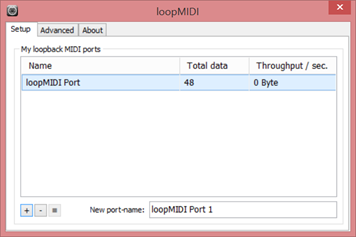
Restart VDJ and your DAW (in my case Cubase). In your DAW, create a MIDI track and set the MIDI input device to loopMIDI Port.
Step 1- Create a custom button in VDJ that can be triggered manually with code:
repeat_start_instant 'StartFunkyChase' 2000ms 2 toggle "$Chase1"
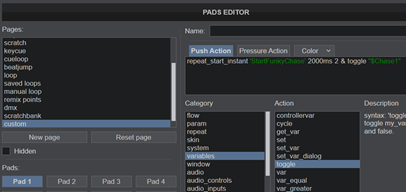
Step 2- Add a mapping in VDJ to the existing LOOPMIDI mapping (which was empty by default) :
<map value="LED_CHASE1" action="get_var '$Chase1'" />
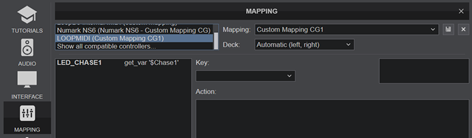
BTW, the mapping file is placed in the the VirtualDJ mappers directory (in my case C:\Users\myname\Documents\VirtualDJ\Mappers)
Step 3- Create a VirtualDJ device for LOOPMIDI (there was none) with the filename LOOPMIDI.xml in the VirtualDJ device directory (in my case C:\Users\myname\Documents\VirtualDJ\Devices) with the code:
<?xml version="1.0" encoding="UTF-8"?>
<device name="LOOPMIDI" author="locodog" version="805" description="LOOPMIDI" type="MIDI" decks="2" drivername="loopMIDI port" >
<bar cc="0x00" name="CROSSFADER_REPORT" channel="0" />
<bar cc="0x01" name="VARIABLE_REPORT" channel="0" />
<led note="0x17" name="LED_CHASE1" channel="1" />
</device>

What happens here is that once the pad is triggered (or the POI is triggered if you place the command of step 1 into a song), MIDI note 0x17 (in HEX, which is 23 in decimal) will be triggered to ON and then 10ms later to OFF. And if all is fine, the note is received in your DAW.
So let me summarize this for everyone that wants to do this in the future:
I am trying to implement this solution to send midi note information from VirtualDJ to Cubase (or any popular DAW such as Ableton) via LoopBe1 (a free virtual midi driver).
My goal : Once I am able to send MIDI notes/controls to my DAW, I will be able to control my live performance in the DAW from VDJ by remapping them in the DAW (for example to mute/unmute a track in the DAW, start recording to record a live played drum beat-loop, etc.).
How-to:
Step 0- Download and install loopMIDI from Tobias Erichsen which is available here : https://www.tobias-erichsen.de/software/loopmidi.html
loopMIDI is a software can be used to create virtual loopback MIDI-ports to interconnect applications on Windows that want to open hardware-MIDI-ports for communication.
Start loopMIDI, create a port in loopMIDI by pressing the ‘+’ icon.
Restart VDJ and your DAW (in my case Cubase). In your DAW, create a MIDI track and set the MIDI input device to loopMIDI Port.
Step 1- Create a custom button in VDJ that can be triggered manually with code:
repeat_start_instant 'StartFunkyChase' 2000ms 2 toggle "$Chase1"
Step 2- Add a mapping in VDJ to the existing LOOPMIDI mapping (which was empty by default) :
<map value="LED_CHASE1" action="get_var '$Chase1'" />
BTW, the mapping file is placed in the the VirtualDJ mappers directory (in my case C:\Users\myname\Documents\VirtualDJ\Mappers)
Step 3- Create a VirtualDJ device for LOOPMIDI (there was none) with the filename LOOPMIDI.xml in the VirtualDJ device directory (in my case C:\Users\myname\Documents\VirtualDJ\Devices) with the code:
<?xml version="1.0" encoding="UTF-8"?>
<device name="LOOPMIDI" author="locodog" version="805" description="LOOPMIDI" type="MIDI" decks="2" drivername="loopMIDI port" >
<bar cc="0x00" name="CROSSFADER_REPORT" channel="0" />
<bar cc="0x01" name="VARIABLE_REPORT" channel="0" />
<led note="0x17" name="LED_CHASE1" channel="1" />
</device>
What happens here is that once the pad is triggered (or the POI is triggered if you place the command of step 1 into a song), MIDI note 0x17 (in HEX, which is 23 in decimal) will be triggered to ON and then 10ms later to OFF. And if all is fine, the note is received in your DAW.
Posted Wed 13 Apr 22 @ 3:27 am
artdecho
Can I use a variable in the Device commands in order (for instance) to define which MIDI note will be sent (to a DAW) from a POI or from a Custom Pad?
So far it works if the MIDI note is hardcoded in the Device file:
POI or Custom Pad: set "$SEND_NOTE_01" 0 & repeat_start_instant 'SendNote' 1000ms 2 & toggle "$SEND_NOTE_01"
Mapping file: <map value="SEND_NOTE_01" action="get_var $SEND_NOTE_01" />
Device file (this works but it is hardcoded): <led note="0x17" name="SEND_NOTE_01" channel="1" />
So in this example, the MIDI note is hardcoded to 0x17, the good MIDI note is sent (0x17) to my DAW.
Instead I would like to ‘control the value’ from a POI or Custom Pad. I tried this but it did not work:
POI or Custom Pad: set_var "$NOTE_01" 40 & param_cast & debug
POI or Custom Pad (same): set "$SEND_NOTE_01" 0 & repeat_start_instant 'SendNote' 1000ms 2 & toggle "$SEND_NOTE_01"
Mapping file: <map value="GET_NOTE_01" action="get_var $NOTE_01" />
Mapping file (same): <map value="SEND_NOTE_01" action="get_var $SEND_NOTE_01" />
Device file (this is does not work): <led note="GET_NOTE_01" name="SEND_NOTE_01" channel="1" />
This does not work, the value sent is 0.
I also tried all these but it does not work either:
<led note="GET_NOTE_01" name="SEND_NOTE_01" channel="1" />
<led note='`GET_NOTE_01' name="SEND_NOTE_01" channel="1" />
<led note='GET_NOTE_01' name="SEND_NOTE_01" channel="1" />
<<led note=GET_NOTE_01 name="SEND_NOTE_01" channel="1" />
Any way to achieve this? It will also be useful to send program changes or control controllers from a POI/custom pad.
Thanks
Christian
So far it works if the MIDI note is hardcoded in the Device file:
POI or Custom Pad: set "$SEND_NOTE_01" 0 & repeat_start_instant 'SendNote' 1000ms 2 & toggle "$SEND_NOTE_01"
Mapping file: <map value="SEND_NOTE_01" action="get_var $SEND_NOTE_01" />
Device file (this works but it is hardcoded): <led note="0x17" name="SEND_NOTE_01" channel="1" />
So in this example, the MIDI note is hardcoded to 0x17, the good MIDI note is sent (0x17) to my DAW.
Instead I would like to ‘control the value’ from a POI or Custom Pad. I tried this but it did not work:
POI or Custom Pad: set_var "$NOTE_01" 40 & param_cast & debug
POI or Custom Pad (same): set "$SEND_NOTE_01" 0 & repeat_start_instant 'SendNote' 1000ms 2 & toggle "$SEND_NOTE_01"
Mapping file: <map value="GET_NOTE_01" action="get_var $NOTE_01" />
Mapping file (same): <map value="SEND_NOTE_01" action="get_var $SEND_NOTE_01" />
Device file (this is does not work): <led note="GET_NOTE_01" name="SEND_NOTE_01" channel="1" />
This does not work, the value sent is 0.
I also tried all these but it does not work either:
<led note="GET_NOTE_01" name="SEND_NOTE_01" channel="1" />
<led note='`GET_NOTE_01' name="SEND_NOTE_01" channel="1" />
<led note='GET_NOTE_01' name="SEND_NOTE_01" channel="1" />
<<led note=GET_NOTE_01 name="SEND_NOTE_01" channel="1" />
Any way to achieve this? It will also be useful to send program changes or control controllers from a POI/custom pad.
Thanks
Christian
Posted Sat 16 Apr 22 @ 2:18 pm
locoDog
why do it in the def? just def every note and have a variable for each def name.
Posted Sat 16 Apr 22 @ 2:23 pm
artdecho
You mean like this?:
Mapping file:
<!-- Note -->
<map value="SEND_NOTE_00" action="get_var $SEND_NOTE_00" />
<map value="SEND_NOTE_01" action="get_var $SEND_NOTE_01" />
<map value="SEND_NOTE_02" action="get_var $SEND_NOTE_02" />
<map value="SEND_NOTE_03" action="get_var $SEND_NOTE_03" />
<!-- Program Change -->
<map value="SEND_PC_00" action="get_var $SEND_PC_00" />
<map value="SEND_PC_01" action="get_var $SEND_PC_01" />
<map value="SEND_PC_02" action="get_var $SEND_PC_02" />
<map value="SEND_PC_03" action="get_var $SEND_PC_03" />
Device file:
<!-- Note -->
<led note="0X00" name="SEND_NOTE_00" channel="1" />
<led note="0X01" name="SEND_NOTE_01" channel="1" />
<led note="0X02" name="SEND_NOTE_02" channel="1" />
<led note="0X03" name="SEND_NOTE_03" channel="1" />
<led note="0X04" name="SEND_NOTE_04" channel="1" />
<!-- Program Change -->
<led cc="0X00" value="0x00" name="SEND_PC_00" channel="1" />
<led cc="0X00" value="0x01" name="SEND_PC_01" channel="1" />
<led cc="0X00" value="0x02" name="SEND_PC_02" channel="1" />
<led cc="0X00" value="0x03" name="SEND_PC_03" channel="1" />
Mapping file:
<!-- Note -->
<map value="SEND_NOTE_00" action="get_var $SEND_NOTE_00" />
<map value="SEND_NOTE_01" action="get_var $SEND_NOTE_01" />
<map value="SEND_NOTE_02" action="get_var $SEND_NOTE_02" />
<map value="SEND_NOTE_03" action="get_var $SEND_NOTE_03" />
<!-- Program Change -->
<map value="SEND_PC_00" action="get_var $SEND_PC_00" />
<map value="SEND_PC_01" action="get_var $SEND_PC_01" />
<map value="SEND_PC_02" action="get_var $SEND_PC_02" />
<map value="SEND_PC_03" action="get_var $SEND_PC_03" />
Device file:
<!-- Note -->
<led note="0X00" name="SEND_NOTE_00" channel="1" />
<led note="0X01" name="SEND_NOTE_01" channel="1" />
<led note="0X02" name="SEND_NOTE_02" channel="1" />
<led note="0X03" name="SEND_NOTE_03" channel="1" />
<led note="0X04" name="SEND_NOTE_04" channel="1" />
<!-- Program Change -->
<led cc="0X00" value="0x00" name="SEND_PC_00" channel="1" />
<led cc="0X00" value="0x01" name="SEND_PC_01" channel="1" />
<led cc="0X00" value="0x02" name="SEND_PC_02" channel="1" />
<led cc="0X00" value="0x03" name="SEND_PC_03" channel="1" />
Posted Sun 17 Apr 22 @ 4:22 am
 agammas
An important correction to the first post:
In order for the button (pad) and poi commands to work, you need to write:
repeat_start_instant 'StartFunkyChase' 2000ms 2 & toggle "$Chase1"
& sign in missed
moderator: Fixed
In order for the button (pad) and poi commands to work, you need to write:
repeat_start_instant 'StartFunkyChase' 2000ms 2 & toggle "$Chase1"
& sign in missed
moderator: Fixed
Posted Wed 23 Nov 22 @ 5:05 pm
HipoxMusic
I just want to say thank you, it really works and I find it amazing.
Posted Tue 13 May 25 @ 3:58 pm
 That Man Bryn
This has got me stumped, I've followed along and believe I have all parts set up correctly. I just can't get the midi to connect to ableton, or show on midimonitor. I'm on Mac. Here's what i've got, does anything jump out as wrong? I'll keep messing
Device setup

Mapper setup

Button setup

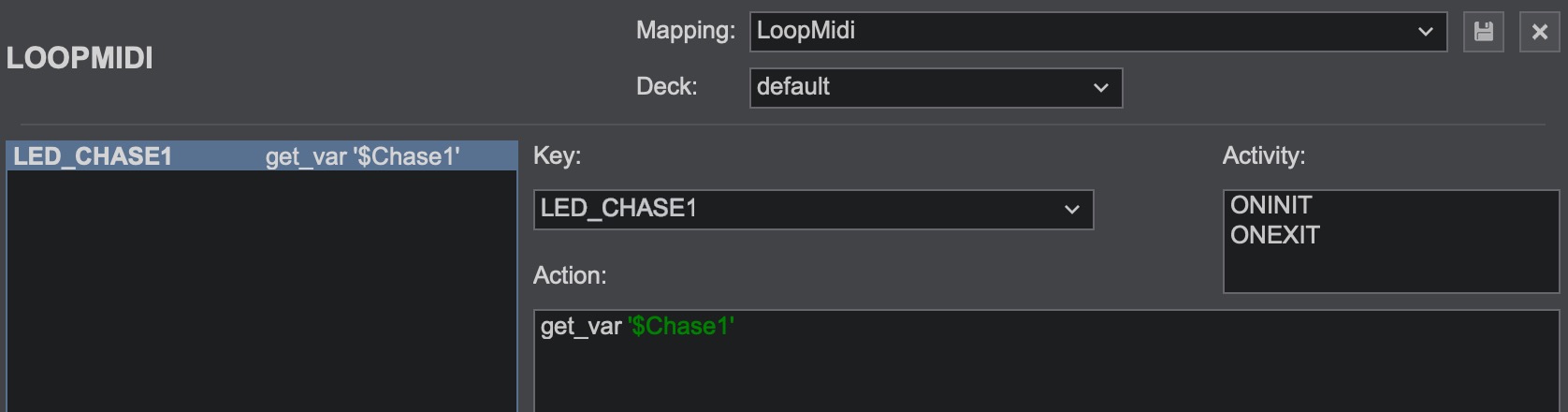
Midi setup
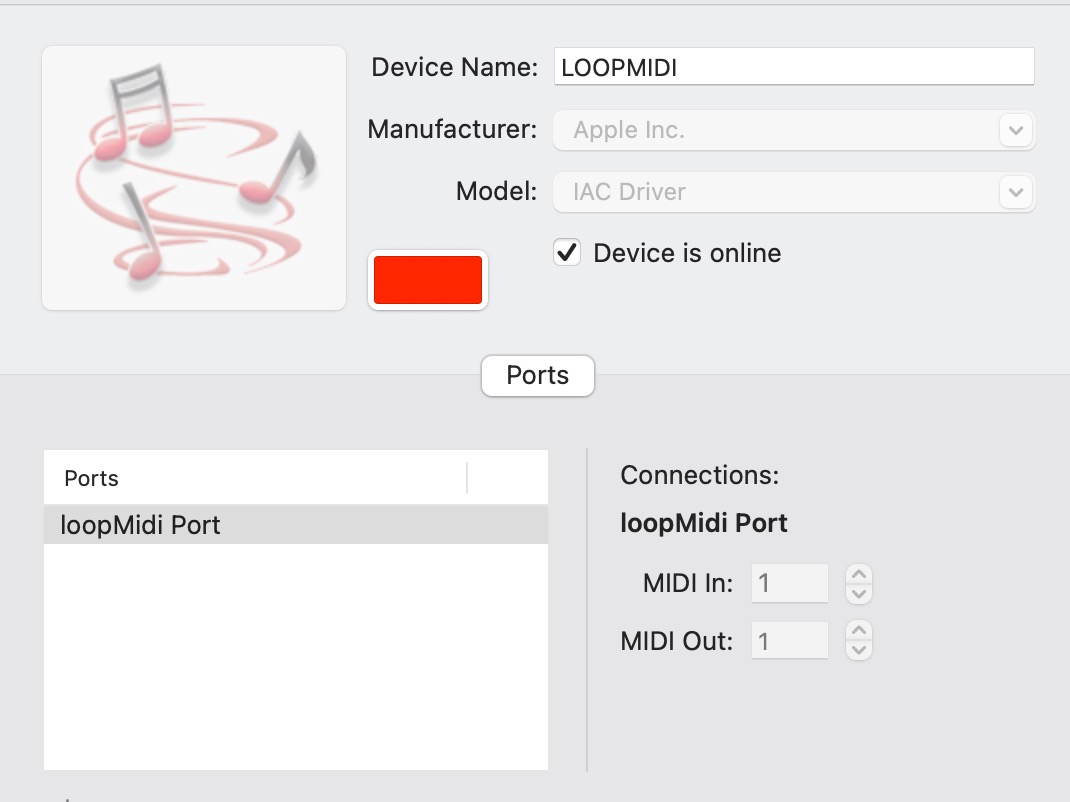
Thanks
Device setup
Mapper setup
Button setup
Midi setup
Thanks
Posted Thu 29 Jan 26 @ 10:56 am
locoDog
Mac doesn't need 3rd party apps, it has IAC driver that does the job, [but should work with 3rd party]
More importantly your .def and .mapper need the same device name [it's how they are linked]
.def for mac
.mapper
Also remember VDJ correctly starts counting midi channels from ZERO [because what is sent down the wire is 1 byte, 00-15, or 0x0-0xF in hex]
Most other programs start counting midi channel from 1 to 16
I've got a whole skin [with about 20 or so users] devoted to placing action poi quickly [no typing] and a full def and mapping to go with it. Especially catered to OS2L and MIDI note out.
Most recent iteration, is midi CC for a guy who jams on his guitar over tracks and the POI send midi CC to his multifunction fx pedal and looper.
If interested send me a pm.
More importantly your .def and .mapper need the same device name [it's how they are linked]
.def for mac
<?xml version="1.0" encoding="UTF-8"?>
<device name="MYMIDILOOP" author="locoDog" version="802" description="MIDILOOP" type="MIDI" decks="2" drivername="IAC Driver" >
...
.mapper
<?xml version="1.0" encoding="UTF-8"?>
<mapper device="MYMIDILOOP" version="850" date="2024-03-01">
...
Also remember VDJ correctly starts counting midi channels from ZERO [because what is sent down the wire is 1 byte, 00-15, or 0x0-0xF in hex]
Most other programs start counting midi channel from 1 to 16
I've got a whole skin [with about 20 or so users] devoted to placing action poi quickly [no typing] and a full def and mapping to go with it. Especially catered to OS2L and MIDI note out.
Most recent iteration, is midi CC for a guy who jams on his guitar over tracks and the POI send midi CC to his multifunction fx pedal and looper.
If interested send me a pm.
Posted Thu 29 Jan 26 @ 11:32 am
That Man Bryn
Superb mate, that's got it working, thank you. My aim is to get the faders on my controller sending midi out to control ableton, so for now i'll fiddle around till I get that working, Thanks for the heads up on your skin, i'll keep that in mind.
Posted Thu 29 Jan 26 @ 12:11 pm
locoDog
oh right, so note with velocity as <LED> or maybe CC as <BAR>, I've done that kind of round trip before.
inbound Hardware talks to its mapping
mapping sets variables
outbound virtual device mapping watches variables
talks to virtual device .def
.def talks to IAC driver
IAC talks to DAW, lamping software, radio software, whatever.
inbound Hardware talks to its mapping
mapping sets variables
outbound virtual device mapping watches variables
talks to virtual device .def
.def talks to IAC driver
IAC talks to DAW, lamping software, radio software, whatever.
Posted Thu 29 Jan 26 @ 12:41 pm
artdecho
Happy to see that this thread helps ! :)
Posted Thu 29 Jan 26 @ 3:31 pm
That Man Bryn
artdecho wrote :
Happy to see that this thread helps ! :)
It's definitely helping and confusing haha!
A question on native devices, if I want to create a modification to an existing native devices ie kOntrol d2, do I create a new definition for it, or edit the existing one?
Posted Thu 29 Jan 26 @ 5:25 pm
That Man Bryn
That Man Bryn wrote :
It's definitely helping and confusing haha!
A question on native devices, if I want to create a modification to an existing native devices ie kOntrol d2, do I create a new definition for it, or edit the existing one?
artdecho wrote :
Happy to see that this thread helps ! :)
It's definitely helping and confusing haha!
A question on native devices, if I want to create a modification to an existing native devices ie kOntrol d2, do I create a new definition for it, or edit the existing one?
Don't worry I've solved it, I was making things far too complicated, o dialled it back to setting vars on the spare faders of my controllers resulting in smooth control of the track volumes in Ableton, perfecto.
Thanks for all the help, this place rocks
Posted Thu 29 Jan 26 @ 9:50 pm
That Man Bryn
That Man Bryn wrote :
It's definitely helping and confusing haha!
A question on native devices, if I want to create a modification to an existing native devices ie kOntrol d2, do I create a new definition for it, or edit the existing one?
artdecho wrote :
Happy to see that this thread helps ! :)
It's definitely helping and confusing haha!
A question on native devices, if I want to create a modification to an existing native devices ie kOntrol d2, do I create a new definition for it, or edit the existing one?
Don't worry I've solved it, I was making things far too complicated, o dialled it back to setting vars on the spare faders of my controllers resulting in smooth control of the track volumes in Ableton, perfecto.
Thanks for all the help, this place rocks
Posted Thu 29 Jan 26 @ 9:50 pm