


 groovindj

Posted Sun 14 Apr 24 @ 3:24 pm
 Matty1000
groovindj wrote :
ok the issue I have at the moment is that the 0db on my pioneer Rev 5 is roughly at the middle point where the -18db is on the software (this would be -18db accordong to your diagram right?). my understanding is that i should be keeping around the 0db mark on the mixer, but because there are no markings on the VU in virtual dj its hard to know where you are. even if they are just colors or lines, it would be helpful, because it is often hard to see the markings on the hardware mixers in the dark

Posted Sun 14 Apr 24 @ 4:20 pm
groovindj
As long as you have autogain turned on in VDJ (the recommended setting) then you really don't need to worry 99.9% of the time.
Often, DJ equipment that handles both analogue inputs and digital signals via USB will have the meter markings show the analogue scale. When used with DJ software, you might assume something's wrong when the LEDs are going above "zero" but actually 0dB is at the top.
If you want to confirm, play an analogue signal on one channel of your unit and have VDJ play the same track on the other, and see where the meters sit.
Often, DJ equipment that handles both analogue inputs and digital signals via USB will have the meter markings show the analogue scale. When used with DJ software, you might assume something's wrong when the LEDs are going above "zero" but actually 0dB is at the top.
If you want to confirm, play an analogue signal on one channel of your unit and have VDJ play the same track on the other, and see where the meters sit.
Posted Sun 14 Apr 24 @ 4:34 pm
Matty1000
groovindj wrote :
As long as you have autogain turned on in VDJ (the recommended setting) then you really don't need to worry 99.9% of the time.
Often, DJ equipment that handles both analogue inputs and digital signals via USB will have the meter markings show the analogue scale. When used with DJ software, you might assume something's wrong when the LEDs are going above "zero" but actually 0dB is at the top.
If you want to confirm, play an analogue signal on one channel of your unit and have VDJ play the same track on the other, and see where the meters sit.
Often, DJ equipment that handles both analogue inputs and digital signals via USB will have the meter markings show the analogue scale. When used with DJ software, you might assume something's wrong when the LEDs are going above "zero" but actually 0dB is at the top.
If you want to confirm, play an analogue signal on one channel of your unit and have VDJ play the same track on the other, and see where the meters sit.
ok that makes sense, except , the Rev5 doesnt take any analogue inputs into the channels so this would mean the db markings make no sense
Posted Sun 14 Apr 24 @ 4:56 pm
groovindj
Er.......well it's probably just done so the meters tie in with other equipment which does have mixed analogue/digital signals.
I'm sure some customers would be confused if they were confronted with certain kit that had 0dB at the top, and other kit with 0dB lower down.
They go with what people are more familiar with, I guess. It's fairly arbitrary anyway as it only says dB.
I'm sure some customers would be confused if they were confronted with certain kit that had 0dB at the top, and other kit with 0dB lower down.
They go with what people are more familiar with, I guess. It's fairly arbitrary anyway as it only says dB.
Posted Sun 14 Apr 24 @ 6:50 pm
Matty1000
groovindj wrote :
As long as you have autogain turned on in VDJ (the recommended setting) then you really don't need to worry 99.9% of the time.
Often, DJ equipment that handles both analogue inputs and digital signals via USB will have the meter markings show the analogue scale. When used with DJ software, you might assume something's wrong when the LEDs are going above "zero" but actually 0dB is at the top.
If you want to confirm, play an analogue signal on one channel of your unit and have VDJ play the same track on the other, and see where the meters sit.
Often, DJ equipment that handles both analogue inputs and digital signals via USB will have the meter markings show the analogue scale. When used with DJ software, you might assume something's wrong when the LEDs are going above "zero" but actually 0dB is at the top.
If you want to confirm, play an analogue signal on one channel of your unit and have VDJ play the same track on the other, and see where the meters sit.
I play a lot of live music that changes volume a lot mid song , i feel i have more control with manual gain, but it could be an old habit.... ill see how it goes with it for a couple of gigs
Posted Tue 16 Apr 24 @ 10:42 pm
 locoDog
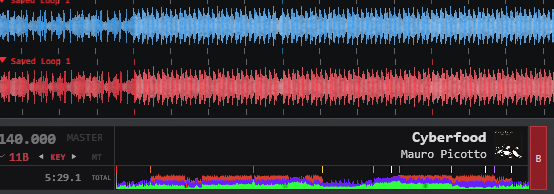
songpos colors are kind of cool, I never really knew about them,
I like that kind of information to be uniform so always opted for neutral.
Monochrome and with common colours is more descriptive but scratch wave isn't as good.
Could they be separated?
current setting coloredWaveForms [just being scratch]
new setting coloredSongpos
Posted 4 days ago @ 11:26 am
locoDog
<scratchwave> rework with these params like songpos?
<scratchwave half="true" colorBass="#D23D2D" colorMed="#6620FF" colorHigh="#31FF3D"
oh and loops & markers to have their own entries so they can all have different dy for their gfx and text
<scratchwave half="true" colorBass="#D23D2D" colorMed="#6620FF" colorHigh="#31FF3D"
oh and loops & markers to have their own entries so they can all have different dy for their gfx and text
Posted 4 days ago @ 11:34 am